Guide
AI images for Instagram and social media posts
Choose the shape before you write the prompt: 4:5 for feed posts, 1:1 for square posts and profile images, 9:16 for Stories and Reels. AIPhoto-Generator makes AI images for social media in all three shapes, usually in about 5 seconds, at about 1 megapixel (928 × 1152 pixels for 4:5, 768 × 1376 for 9:16). Keep words out of the image and add your text in an editing app afterwards.
Last updated
Which aspect ratio for each format?
Pick 4:5 for a feed post, 1:1 for a square post or profile image, 9:16 for a Story or a Reel, and 16:9 for a YouTube thumbnail. Each is one of the 6 ratios in the generator. The table shows the exact pixel size you get for each one, next to what the platforms' own help pages say.
| Format | Ratio to pick here | Our output size | Notes |
|---|---|---|---|
| Feed post, portrait | 4:5 | 928 × 1152 px | Instagram keeps feed photos between 1.91:1 and 3:4 without cropping and uploads them at up to 1080 pixels wide. 4:5 sits inside that range. Source: Instagram Help Center: image resolution of photos you share |
| Feed post, taller | 3:4 | 896 × 1200 px | 3:4 is the tallest shape Instagram's help page lists for feed photos. Pick it when you want the most height. Source: Instagram Help Center: image resolution of photos you share |
| Square post or profile image | 1:1 | 1024 × 1024 px | Square is inside Instagram's feed range too. For a profile image, keep the subject in the middle with space around it. Source: Instagram Help Center: image resolution of photos you share |
| Story | 9:16 | 768 × 1376 px | For Stories ads, Meta recommends 9:16 at 1,080 × 1,920 pixels, with a minimum of 600 × 1,067. Our 9:16 size is above that minimum and below the recommended size. Source: Meta Business Help Centre: design requirements for Instagram Stories ads |
| Reel | 9:16 | 768 × 1376 px | Instagram accepts reels from 1.91:1 to 9:16 and recommends 420 × 654 pixels (a 1:1.55 ratio) for cover photos, a shorter shape than 9:16, so keep the subject near the middle. Source: Instagram Help Center: Reel size and aspect ratios |
| YouTube video thumbnail | 16:9 | 1376 × 768 px | YouTube suggests 16:9 and recommends 3840 × 2160 pixels, with a minimum width of 640. Ours clears the minimum but is well below the recommended size. Source: YouTube Help: add custom thumbnails |
Swipe the table sideways to see every column.
Platform numbers checked on on each platform's own help page. Platforms change them, so open the page before you rely on one:
The other ratios, such as 3:2 for photos inside an article, and how to choose between all 6 are covered in our guide to AI image aspect ratios.
Story prompts with real results
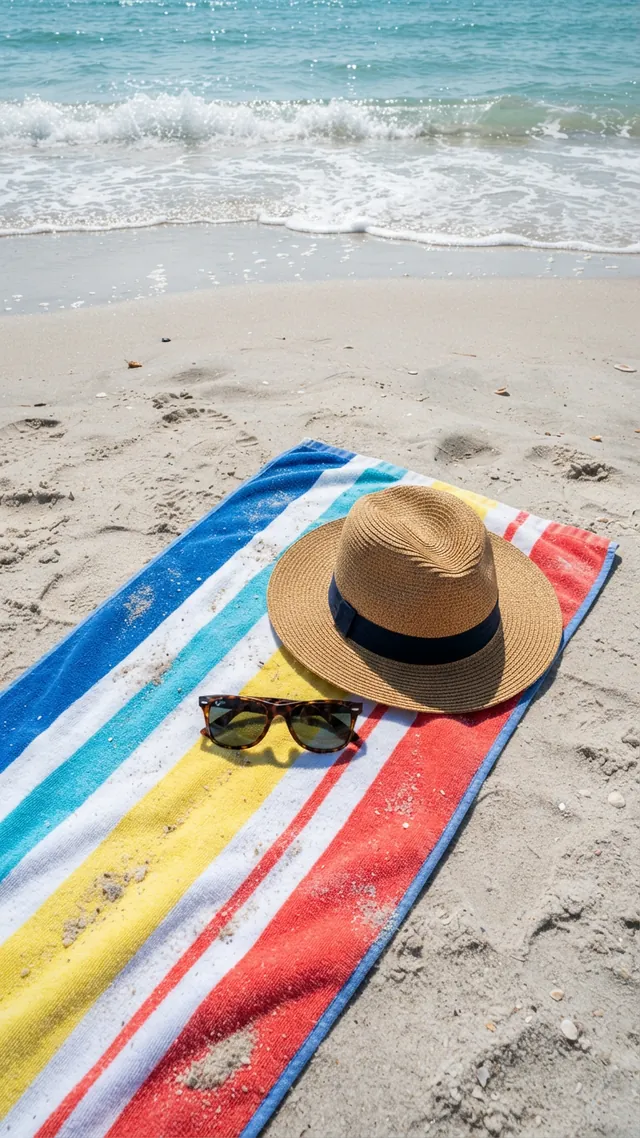
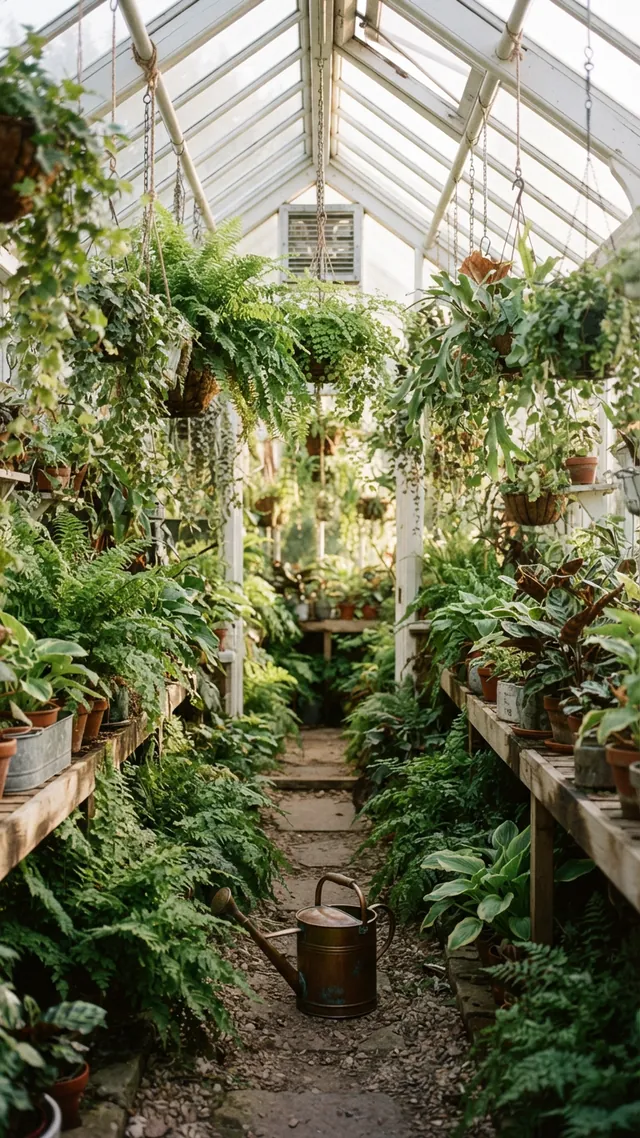
A Story prompt works when it describes a scene with height and says where things sit, because a 9:16 frame is almost twice as tall as it is wide. These three prompts each place something high and something low, in a different style: Cinematic for a bridge at dusk, Photorealistic for a beach seen from above and Editorial for a greenhouse.
Story
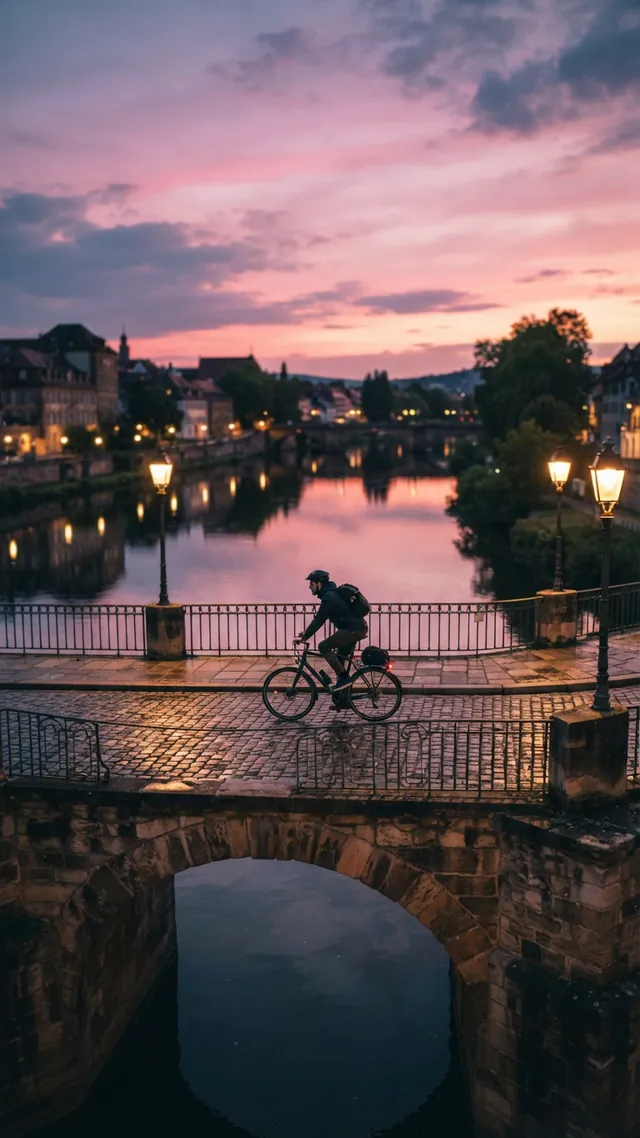
Bridge at dusk
Prompt
A cyclist crossing an old stone bridge at dusk, warm street lamps glowing, pink and violet sky reflected in the river below
- Style
- Cinematic
- Ratio
- 9:16
The Cinematic style adds: “cinematic film still, dramatic lighting, shallow depth of field, rich color grading”
Why it works
The prompt names something for every height of a tall frame: the sky, the street lamps, the bridge and the river below. The image came back with the pink and violet sky across the top third, the cyclist in the middle, and the stone arch and the dark water under it filling the bottom. The warm lamps sit against a cool sky, so the frame holds both warm and cool color.
Try changing
Swap the cyclist for someone walking a dog, or dusk for a misty morning, and keep the river so the sky has somewhere to reflect.
Story
Beach towel from above
Prompt
Overhead view of a striped beach towel, a straw hat and sunglasses on pale sand, gentle surf foam at the top of the frame, bright summer light
- Style
- Photorealistic
- Ratio
- 9:16
The Photorealistic style adds: “photorealistic photograph, natural lighting, sharp focus, high detail”
Why it works
The prompt places each object and even says where the surf goes: “at the top of the frame”. The image came back with that layout: surf along the top, plain sand through the middle, and the towel, hat and sunglasses in the lower half. It is a high angle rather than a straight-down view, which keeps the sea in the picture.
Try changing
Change the towel stripes to your own colors, or write “shot from directly above” and drop the surf for a flatter, flat-lay look.
Story
Greenhouse aisle
Prompt
A narrow greenhouse aisle lined with ferns and hanging plants, morning light through the glass roof, a watering can on the path
- Style
- Editorial
- Ratio
- 9:16
The Editorial style adds: “editorial magazine photography, refined composition, natural tones”
Why it works
A narrow aisle is already a tall subject: the path runs up the frame toward the far end and the plants hang down from the roof. The prompt asks for morning light through the glass roof, and the image came back with soft, even light and muted greens. The copper watering can gives the eye one place to stop. Leaves fill almost every edge, so this one suits a Story with little or no text.
Try changing
Swap the ferns for tomato vines or lemon trees, or set the scene at dusk with string lights. For room to write, ask for an empty path in the foreground.
Want a Story that passes for a real photo? See the nine prompt fixes in how to make AI photos look real.
Feed post prompts with real results
A feed post prompt should name one subject, a plain or simple background and the light, because a 4:5 post is seen small in a scrolling feed and one clear subject still reads at that size. Two of these use the Studio style for product-like shots, and one uses Photorealistic for a lifestyle scene.
Feed post
Candle with space for text
Prompt
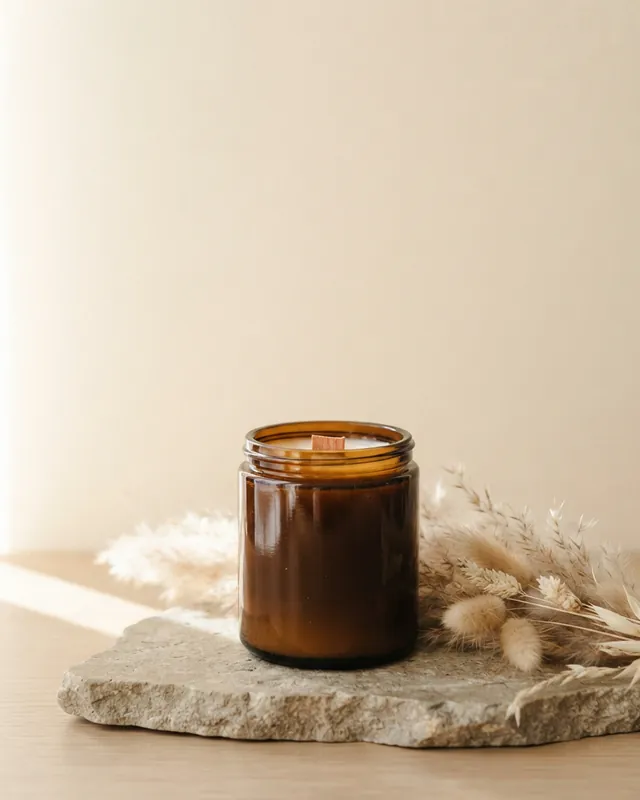
Amber glass candle jar with a wooden wick on a stone slab, dried pampas grass beside it, warm side light, plain cream backdrop with empty space in the upper half
- Style
- Studio
- Ratio
- 4:5
The Studio style adds: “professional studio product photography, unbranded, soft diffused light, seamless backdrop, crisp detail”
Why it works
The prompt ends by asking for a plain cream backdrop with empty space in the upper half, and the image came back with the candle and the pampas grass low in the frame and plain cream wall above. Light falls from the left across the table, and the amber jar is plain, with no printed name.
Try changing
Change the jar to frosted white glass or the grass to dried eucalyptus. Keep the last phrase so your headline still has somewhere to go.
Feed post
White canvas sneakers
Prompt
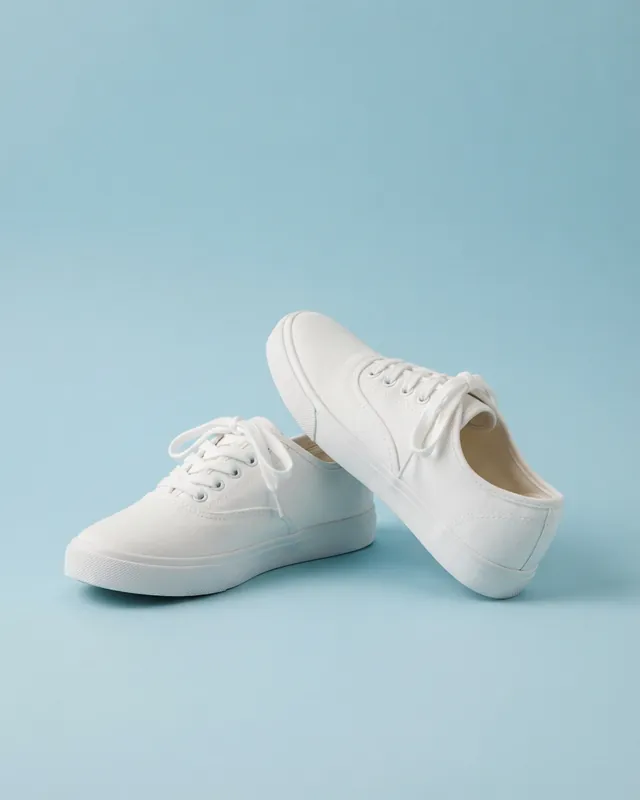
A pair of plain white canvas sneakers on a pastel blue backdrop, one shoe tilted on its side, soft shadow, minimal composition
- Style
- Studio
- Ratio
- 4:5
The Studio style adds: “professional studio product photography, unbranded, soft diffused light, seamless backdrop, crisp detail”
Why it works
The prompt asks for plain white canvas sneakers with one shoe tilted on its side. The image came back with one shoe flat and the other tipped up against it, and no logo is visible on either. The pastel blue backdrop fills the top third, a calm area for a caption.
Try changing
Change the backdrop to a color from your own palette, or canvas to suede. Keep “plain” in the prompt, and still check the result for invented logos before you post.
Feed post
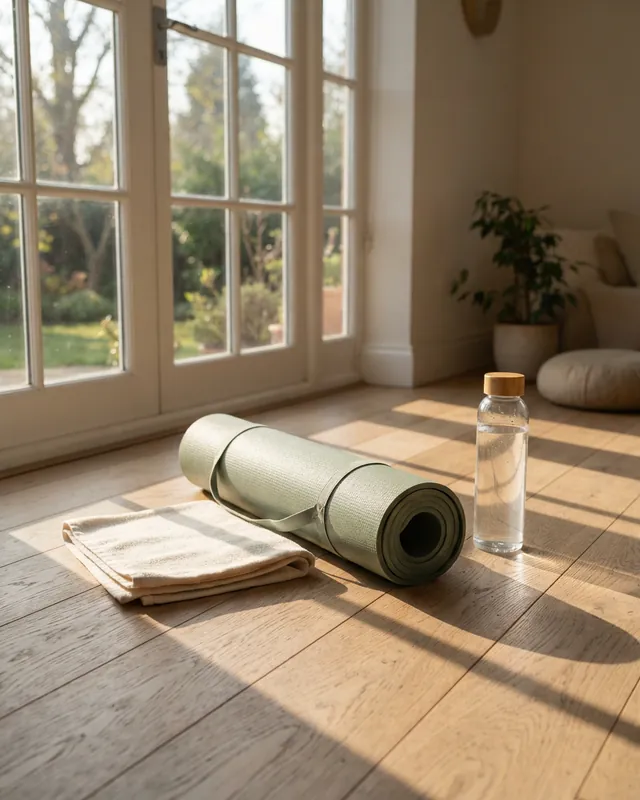
Yoga corner by the window
Prompt
A rolled sage-green yoga mat, a glass water bottle and a folded towel on a light oak floor by a tall window, morning sun casting long shadows
- Style
- Photorealistic
- Ratio
- 4:5
The Photorealistic style adds: “photorealistic photograph, natural lighting, sharp focus, high detail”
Why it works
The prompt names three objects and one light, morning sun casting long shadows, and the image came back with window-frame shadows stretched across the oak floor. It also added things nobody asked for: a potted plant, a floor cushion and a garden outside the glass doors. They suit the scene, but they show that the model fills in whatever the prompt leaves open.
Try changing
Add “nothing else on the floor” if you want only the three objects, or change the mat color to match your feed.
To see how Studio differs from the other styles, read the Studio section of our styles guide. For more portrait and square ideas, try the skincare flat lay (4:5) and the latte from above (1:1) on the prompts page.
Leave room for your text
Keep words out of the prompt, ask for a plain area where your text will go, and add the text afterwards in an editing app. Moda's own description of this model points to its higher tiers for “heavy in-image text”, so lettering from this model is unreliable.
The words we used
Candle prompt
Amber glass candle jar with a wooden wick on a stone slab, dried pampas grass beside it, warm side light, plain cream backdrop with empty space in the upper half
The prompt asks for “plain cream backdrop with empty space in the upper half”, and the image came back with a plain cream upper half and the candle low in the frame: room for a headline with nothing to clean up. See the full candle example.
Ways to ask for space
- Say where the space goes, such as “empty space in the upper half” or “on the left side”.
- Name what fills it: a plain backdrop, a wall, sky or sand.
- Keep the subject small, or low in the frame.
- Other images here already have calm areas: the sky in the bridge Story, the blue backdrop above the sneakers and the plain sand on the beach.
- Preview in the app before you post, because apps place their own buttons and names over parts of a Story.
Make a carousel that looks like a set
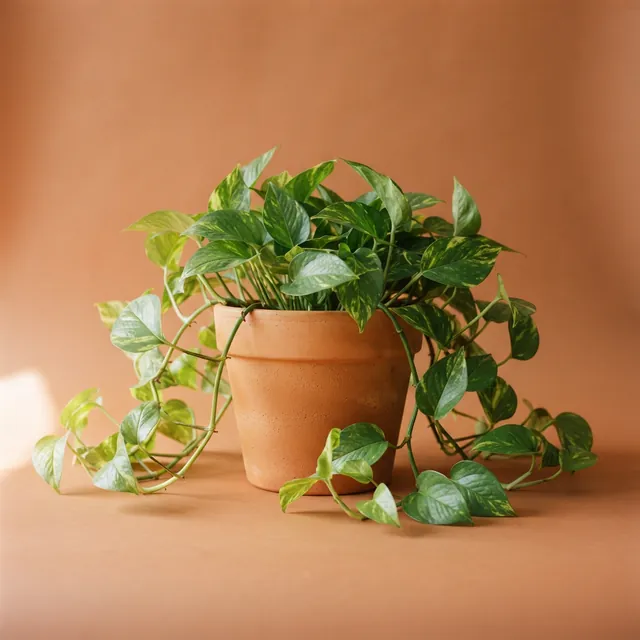
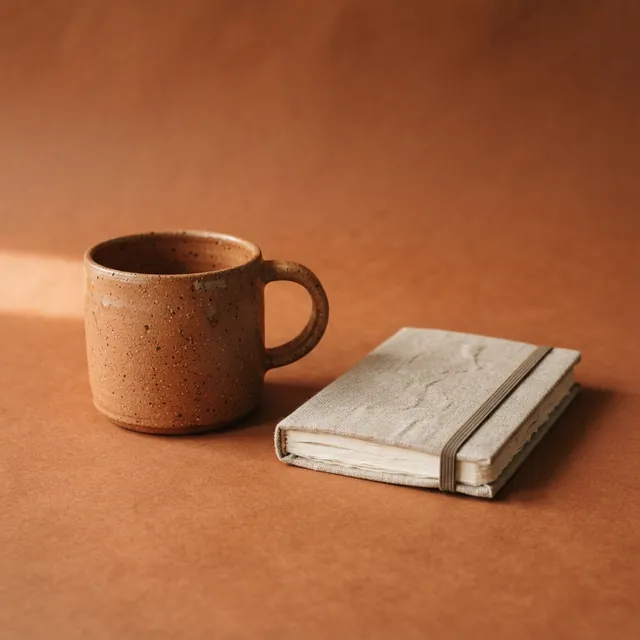
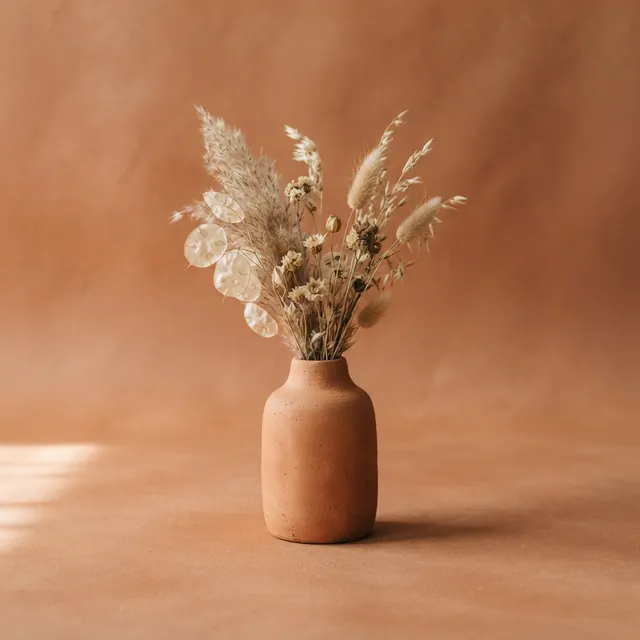
To make carousel slides look like one set, repeat the same backdrop and light words in every prompt and change only the object. Our three slides share “on a terracotta-colored backdrop, soft warm side light, minimal composition”, the Studio style and the 1:1 ratio, and they came back as a matching set.
 Slide 1
Carousel 1: trailing plant
Prompt
A terracotta pot with a trailing pothos plant on a terracotta-colored backdrop, soft warm side light, minimal composition
Studio · 1:1
 Slide 2
Carousel 2: mug and notebook
Prompt
A speckled terracotta ceramic mug and a small linen-bound notebook on a terracotta-colored backdrop, soft warm side light, minimal composition
Studio · 1:1
 Slide 3
Carousel 3: bud vase
Prompt
A terracotta bud vase with dried flowers on a terracotta-colored backdrop, soft warm side light, minimal composition
Studio · 1:1
Highlightedthe phrase all three prompts share, word for word
- What matched
- The terracotta backdrop, a patch of warm light on the left side of the floor, shadows falling to the right, and the subject near the middle with space around it. The objects share the color too: each prompt names a terracotta pot, mug or vase, and each came back terracotta.
- What changed
- The exact backdrop tone: lighter and peachier behind the plant, deeper and browner behind the mug and notebook. The mug and notebook are also seen from a little higher than the plant and the vase.
Expect some variation. There is no seed, so a slide you make again won't match its earlier version. Keep the ratio and the style the same for every slide, and if one comes back off-tone, run that prompt again and keep the closest. Your 3 free images cover one three-slide set; once they are used, any retries use paid images.
Is the image size good enough for social?
For viewing on a phone, yes. Each image is a PNG of about 1 megapixel, which is fine on a phone screen, but it is smaller than the sizes some platforms recommend for uploads, and AIPhoto-Generator has no upscaling to make it bigger.
- Instagram feed. Instagram uploads photos at up to 1080 pixels wide, and keeps a photo between 320 and 1080 pixels wide at its original resolution when its shape is within range. Our 4:5 image is 928 pixels wide and our square is 1024, so they go up at their own size, a little under 1080.
- Stories. For Stories ads, Meta recommends 1,080 × 1,920 pixels with a minimum of 600 × 1,067. Our 9:16 image is 768 × 1376: above the minimum, below the recommendation.
- YouTube thumbnails. YouTube recommends 3840 × 2160 pixels with a minimum width of 640. Our 16:9 image is 1376 × 768.
If a platform or a client asks for a larger file, this image is too small for that slot. The 1280-pixel copies on this page are wider than what the generator gives you; your download is the size shown in the table above. Sources and the date we checked them are listed under the table.
Label AI images where platforms ask you to
If a platform asks you to label or disclose AI-generated images, do it, and never present an AI image as a real person, a real event or a real product result. Rules differ between platforms and change over time, so check them where you post.
- Read the platform's rules. Many platforms have rules or labels for realistic AI-generated content. Look them up in the help pages of the app you post to before you publish.
- No fake customers or events. A generated face is not a customer, and a generated scene is not proof that something happened. Our Terms of Service forbid content intended to deceive, and misleading or harmful depictions of real, identifiable people.
- No made-up results. Don't use a generated image as evidence of what a product does, such as a before-and-after.
We don't add a visible watermark, so if a label is needed, it is yours to add, in the caption or with the platform's own labeling option where it offers one.
What this tool can't do for social
AIPhoto-Generator turns a written prompt into a new still image. It can't edit your photos or selfies, add text from a template or make video, and only your first 3 images are free.
- Your own photos and selfies
- There is no upload, so it can't edit, retouch or restyle a photo of you, your team or your product, and it can't work from a reference image.
- Text and templates
- There are no caption tools, fonts or post templates, and lettering inside images is unreliable. Add your words in an editing app.
- Video
- It makes still images only: no Reels, no Story videos and no animation. You can use a still as a Story frame or a Reels cover.
- Size and repeats
- About 1 megapixel per image, with no upscaling, and no seed, so you can't recreate an image exactly.
- 3 free images
- Your first 3 images are free, with no account and no email, and they don't reset. After that, generating uses paid images from an image pack or the Pro plan. At busy times, free capacity for the whole site can also run out. Need more images? See pricing.
Questions about AI images for social media
Pick one shape per image, keep logos and real people out of the prompt, and expect a different image each time you generate.
Which shape should I pick if I post on several platforms?
Pick the shape of the slot that matters most to you, because the free plan gives one image per prompt at one ratio. A 4:5 or 1:1 image fits inside Instagram's feed range. If you also need a Story, run the prompt again at 9:16 and expect a different image.
Can I post these images on a business or client account?
It can be fine if your use follows three sets of rules: our Terms of Service, the model provider's terms and the rules of the platform where you post. We don't claim ownership of the images you generate. Keep real people, logos and copyrighted characters out of the prompt, and review each image before it goes out.
Can I put my logo or my product into the image?
Not inside AIPhoto-Generator. It works from text alone, so it can't take your logo file or a photo of your product. Generate a scene with a plain area, then place your logo or a real product photo on it in a design app. Use real photos for anything that shows what a buyer will receive.
Can I make the same image again for a later post?
No. Every generation is new and there is no seed, so the same prompt gives a different image each time. Download each image you want to keep straight away, because it is hosted by Moda at an unlisted link that may expire, and keep the prompt with it so you can make similar ones later.
How the examples on this page were made
Every image on this page is a real result from AIPhoto-Generator, generated on from exactly the prompt, style and aspect ratio shown with it.
They were made with the same prompt-building code as our AI photo generator you can try free, which runs nano-banana-lite through Moda's API (Moda lists it as “NanoBanana 2 Lite”, with “gemini” as its provider). Where a style was on, its words were added to the end of the prompt, as they would be for you. The example images were resized for the web to 640 and 1280 pixels wide, cropped to the exact aspect ratio where needed and converted to WebP, without retouching; for every aspect ratio except 16:9 the 1280-pixel copy is larger than the image the generator returns.
AIPhoto-Generator is independent: a customer of Moda, not owned by or affiliated with Moda or Google. See how we review example images.