Guide
AI photo styles, and the exact words each one adds
AIPhoto-Generator offers six AI photo styles: Photorealistic (the default), Cinematic, Studio, Editorial, Illustration and No style. A style is not a different AI model; it is a short phrase added to the end of your prompt. For example, Cinematic adds “cinematic film still, dramatic lighting, shallow depth of field, rich color grading”. Below are the exact words, what each asks for, and a real image made with each.
Last updated
At a glance
What each style adds to your prompt
Each style adds one fixed phrase to the end of your prompt. Photorealistic is selected unless you choose another, and No style adds nothing. The table shows the exact words from the generator's own code.
| Style | Exact words added | What it asks for | Good for | Ratios that suit |
|---|---|---|---|---|
| PhotorealisticDefault | “photorealistic photograph, natural lighting, sharp focus, high detail” | A true-to-life photograph in natural light, sharply focused, with fine detail. | Landscapes, portraits, food and close-ups of nature |
|
| Cinematic | “cinematic film still, dramatic lighting, shallow depth of field, rich color grading” | A frame that looks like a still from a film: dramatic light, a soft out-of-focus background and strong, graded color. | Night scenes, rain, low sun and moody landscapes |
|
| Studio | “professional studio product photography, unbranded, soft diffused light, seamless backdrop, crisp detail” | An unbranded, professional product photo: soft even light, a plain seamless background and crisp detail. | One product on a plain backdrop, ad concepts and product tiles |
|
| Editorial | “editorial magazine photography, refined composition, natural tones” | A magazine-style photo with a carefully arranged composition and natural colors. | Interiors, lifestyle scenes and styled still lifes |
|
| Illustration | “detailed digital illustration, harmonious color palette, clean shapes” | Digital artwork instead of a photo, with colors that work together and clean, simple shapes. | Fantasy scenes, concept art and imagined places |
|
| No style | Nothing | Only what your prompt says. The text is sent as you wrote it. | Prompts that already contain their own style words | Any |
Swipe the table sideways to see every column.
The ratios are suggestions, not limits: every style works with all six aspect ratios (1:1, 4:5, 3:4, 3:2, 16:9 and 9:16). To pick one for where the image will go, see our guide to AI image aspect ratios.
What the model receives: a worked example
Here is the prompt behind the Cabin reading nook example with the Editorial style. AIPhoto-Generator removes any full stop, comma or semicolon at the end of your prompt, adds a full stop and a space, then adds the style's words.
1. Your prompt
Cozy reading nook in a timber cabin, morning light streaming through the window onto a wool throw and stacked books
2. Editorial adds
editorial magazine photography, refined composition, natural tones
3. Text the model receives
Cozy reading nook in a timber cabin, morning light streaming through the window onto a wool throw and stacked books. editorial magazine photography, refined composition, natural tones
The style's words are added on our server when you press Generate, so they never appear in your prompt box. Choosing a style costs nothing extra.
Style 1 of 6
Photorealistic: the default style for true-to-life photos
Choose Photorealistic when the image should look like a real photograph taken in natural light: landscapes, portraits, food and close-ups of nature. Photorealistic is the default style, and it adds “photorealistic photograph, natural lighting, sharp focus, high detail” to the end of your prompt.
Landscapes
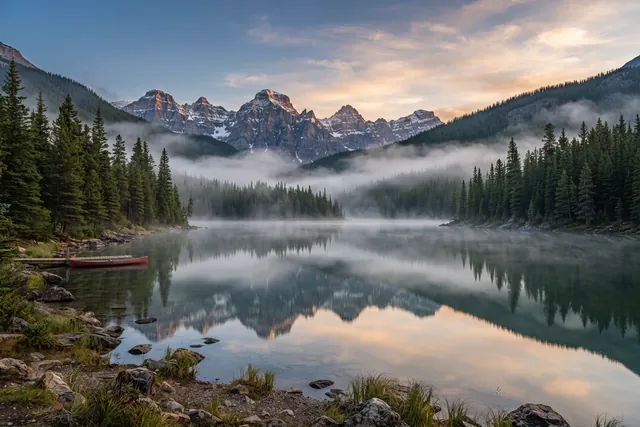
Alpine lake at dawn
Prompt
Still alpine lake at dawn, mist drifting over the water, pine-covered mountains mirrored on the surface
- Style
- Photorealistic
- Ratio
- 3:2
The Photorealistic style adds: “photorealistic photograph, natural lighting, sharp focus, high detail”
What to notice
The prompt only describes the scene: a still lake, drifting mist and mountains mirrored on the surface. The style's words describe how it should be photographed. The red canoe by the shore was never mentioned; the model added it.
With Photorealistic, spend your words on the scene: what is there, where, and at what time of day. The style already asks for natural lighting, sharp focus and high detail, so you don't need to type them again. For prompt fixes that make a result look less artificial, read how to make AI photos look real.
More Photorealistic examples
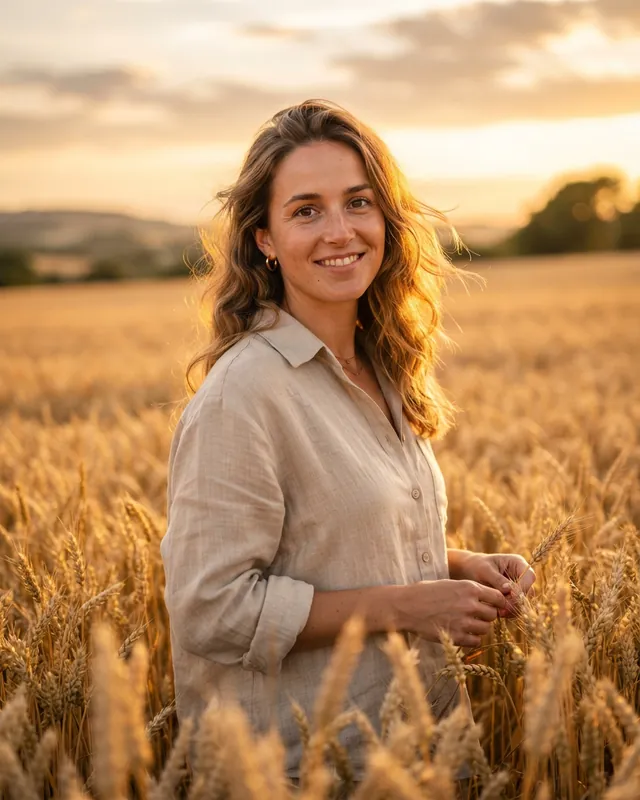
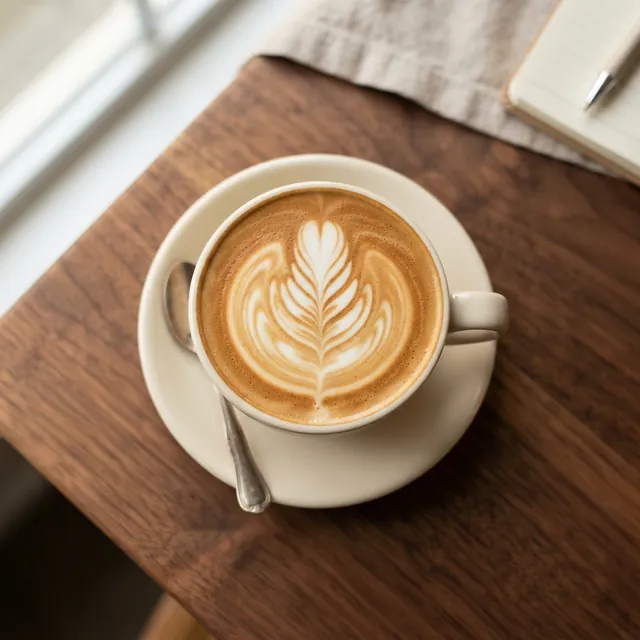
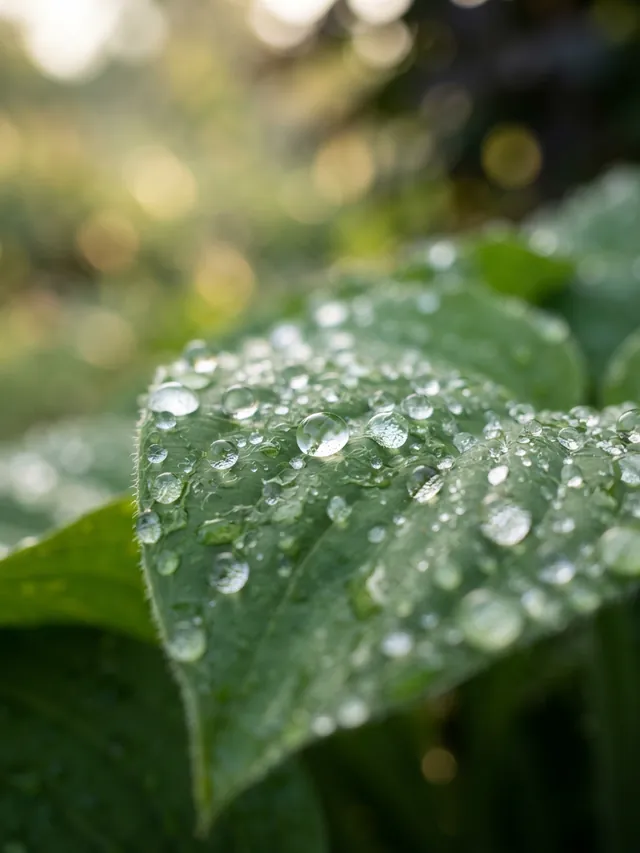
These three were also made with the Photorealistic style, and each has a second real result from the same prompt. Open one to see its full prompt on the AI photo prompts page.
Style 2 of 6
Cinematic prompts: how to get a film look
A cinematic prompt works when mood matters more than accuracy: night scenes, rain, low sun and lone figures. The Cinematic style adds “cinematic film still, dramatic lighting, shallow depth of field, rich color grading”, which asks for a frame that looks like a still from a film, with dramatic light, a soft background and graded color.
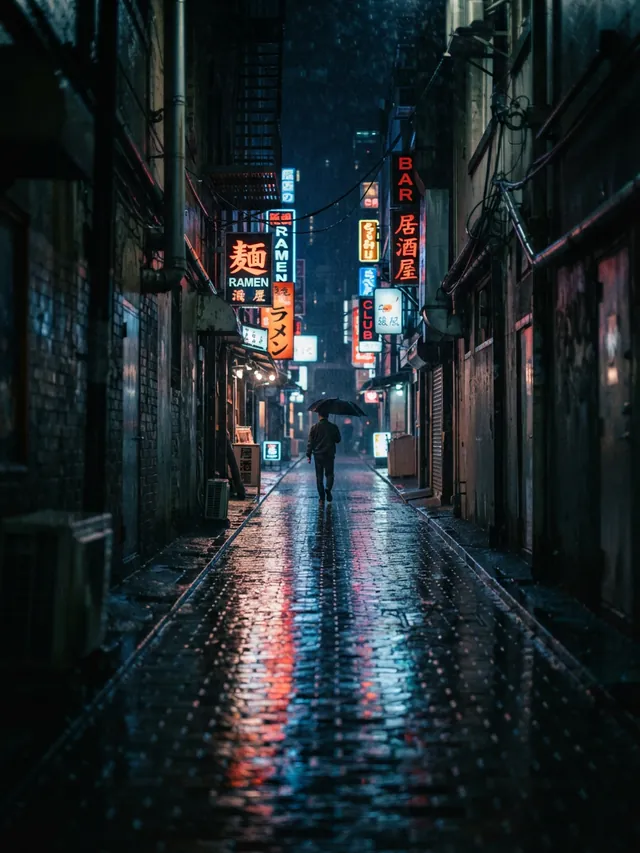
Cinematic
Rainy neon alley
Prompt
Rain-soaked city alley at night, neon signs reflecting on wet pavement, a lone figure with an umbrella in the distance
- Style
- Cinematic
- Ratio
- 3:4
The Cinematic style adds: “cinematic film still, dramatic lighting, shallow depth of field, rich color grading”
What to notice
The wet cobblestones carry the red, orange and blue of the signs down the length of the frame, and the figure with the umbrella sits small in the center, where the lines of the alley meet.
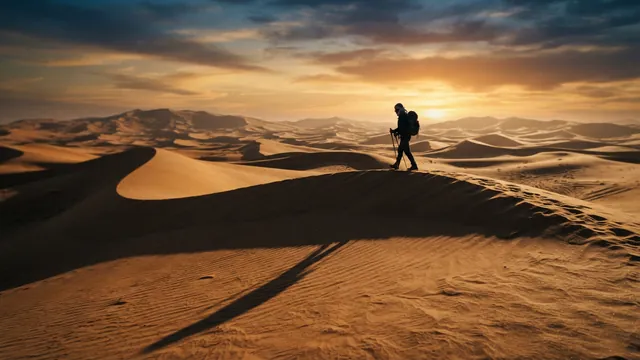
Landscapes
Dunes at sunset
Prompt
Sweeping sand dunes at sunset with long shadows and a lone traveler walking along the ridge
- Style
- Cinematic
- Ratio
- 16:9
The Cinematic style adds: “cinematic film still, dramatic lighting, shallow depth of field, rich color grading”
What to notice
The low sun sits behind the traveler, so the figure reads as a dark shape against the sky, and a long shadow cuts diagonally across the sand in the foreground.
The words behind the two Cinematic examples
The Cinematic style supplies the film look; your prompt supplies the drama for it to light. Both examples above lean on the same few ingredients.
- “at night”“at sunset”
- Both prompts set the scene when daylight is gone or fading, so the light that remains, neon signs or a low sun, carries the mood and gives dramatic lighting something to work with. From: Rainy neon alley and Dunes at sunset.
- “Rain-soaked”“neon signs reflecting on wet pavement”
- Wet ground repeats every light source. In the alley, the red, orange and blue of the signs run down the cobblestones toward the camera. From: Rainy neon alley.
- “long shadows”
- A low sun stretches shadows across the frame, which gives shape and depth to an otherwise plain stretch of sand. From: Dunes at sunset.
- “a lone figure with an umbrella in the distance”“a lone traveler walking along the ridge”
- One small, distant person gives the scene scale and the hint of a story, without asking the model for a detailed face. From: Rainy neon alley and Dunes at sunset.
Framing for 3:4, 16:9 and 9:16
Cinematic results depend on the shape of the frame as much as on the words. Pick the ratio first, then describe a scene that fills it.
3:4
Typical use: taller Instagram feed posts, portraits and Pinterest
A portrait frame with room for depth. Use lines that run away from the camera, such as an alley, a road or a corridor, and place the subject where they meet. In the alley example, the wet cobblestones lead straight to the figure with the umbrella.
See the rainy neon alley example16:9
Typical use: banners, blog headers and slides
A wide frame for horizons and open space. Keep the subject small and off center and let the landscape fill the rest. In the dunes example, the traveler stands right of center on the ridge under a wide sunset sky.
See the dunes at sunset example9:16
Typical use: Stories, Reels and phone wallpapers
The tallest frame. Describe something with height, such as a narrow street, a tall doorway or a figure under a single streetlight, and leave clear space above or below the subject if you plan to add text. For a real 9:16 Cinematic result, see the bridge at dusk in our guide to AI images for social media.
See the bridge at dusk example
Style 3 of 6
Studio product shots: describe the light, not the gear
Choose Studio when the image is about one product, such as a bottle, a vase or a jar, shown on a plain background in soft, even light. The Studio style adds “professional studio product photography, unbranded, soft diffused light, seamless backdrop, crisp detail” to the end of your prompt.
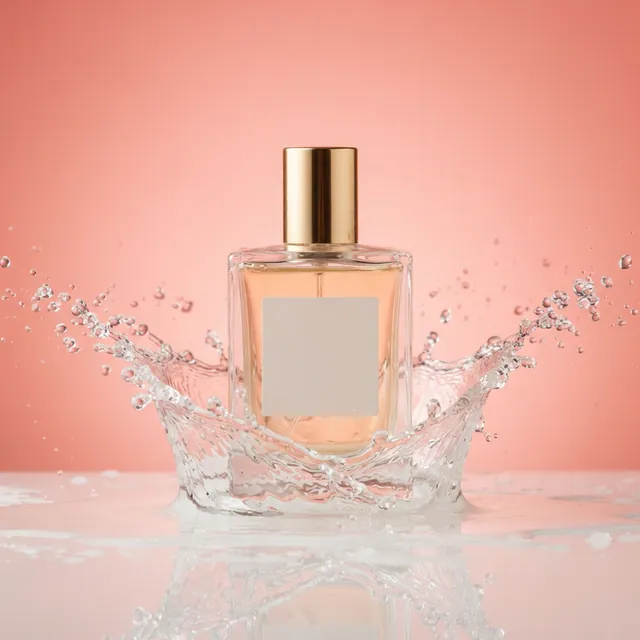
Advertising
Perfume with water splash
Prompt
Glass perfume bottle with a gold cap and a blank, unlabeled front on a glossy surface, frozen water splash around the base, coral studio background
- Style
- Studio
- Ratio
- 1:1
The Studio style adds: “professional studio product photography, unbranded, soft diffused light, seamless backdrop, crisp detail”
What to notice
The prompt asks for a “blank, unlabeled front”, and the bottle came back with an empty label panel and no lettering. The coral background and the glossy surface also come from the prompt, and the surface gives the mirror reflection under the bottle.
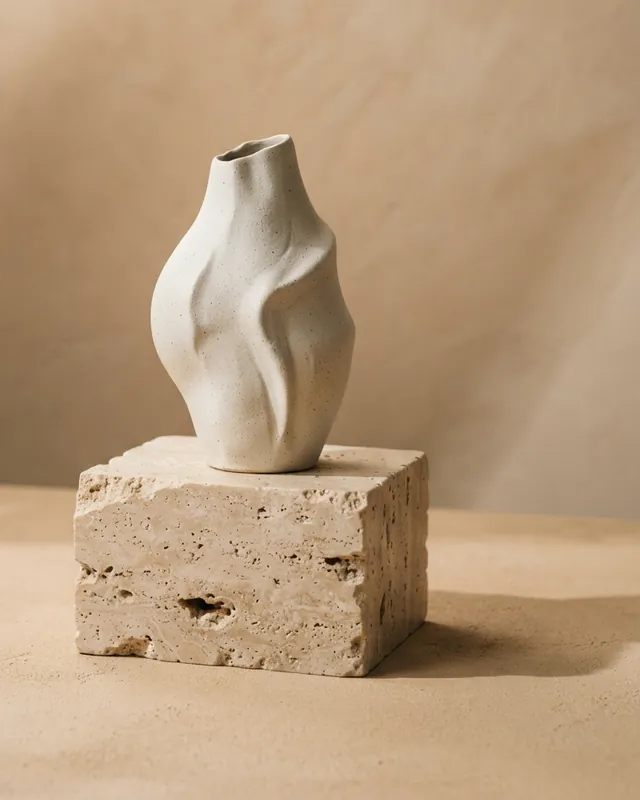
Products
Sculptural ceramic vase
Prompt
Minimal sculptural ceramic vase on a travertine block, soft directional shadows, warm beige studio backdrop
- Style
- Studio
- Ratio
- 4:5
The Studio style adds: “professional studio product photography, unbranded, soft diffused light, seamless backdrop, crisp detail”
What to notice
“Soft directional shadows” describes the light by its effect, and the vase and its travertine block cast soft shadows to one side. No lamp or light stand is named in the text, and none appears in the frame.
What we found while writing the Studio style
Describe the light, not the equipment
In our testing, writing “softbox lighting” made the model draw a softbox into the frame. That is why the Studio style asks for “soft diffused light” instead. The vase prompt follows the same rule: it asks for “soft directional shadows” and never names a lamp. Say what the light does, and leave the gear out.
Ask for unbranded products and blank labels
We found that nano-banana-lite tends to invent trademark-like logos on products, so the Studio style includes “unbranded”. That is not a guarantee: our first renders of the perfume and skincare prompts, both made with the Studio style, still printed invented brand-like names on the bottles, some close to real beauty brands. We wrote “blank, unlabeled” into both prompts and generated them again, and the bottles came back without names; the perfume bottle has a blank label panel.
Check product images for made-up names and logos, and add any real text afterwards in your own design software: text inside images is unreliable with this model.
Seamless and colored backdrops
The Studio style asks for a “seamless backdrop”: a plain, continuous background with nothing behind the product. You choose its color and the surface the product stands on. The perfume prompt asks for a “coral studio background” and a “glossy surface”. The vase prompt asks for a “warm beige studio backdrop” and puts the vase “on a travertine block”, a simple plinth that lifts it off the floor.
Pick a backdrop color that sets the product apart: clear glass and a gold cap against coral, white ceramic against warm beige.
Style 4 of 6
Editorial vs Photorealistic: what's the difference?
Editorial and Photorealistic both aim for a real-looking photo, but they ask for different things. Photorealistic asks for sharp, highly detailed, natural-light realism. Editorial asks for a composed, magazine-style scene with natural tones, so choose it when the arrangement of a room or a moment matters more than fine detail.
Photorealistic
“photorealistic photograph, natural lighting, sharp focus, high detail”
- Asks for
- Accuracy: natural light, sharp focus and high detail.
- Choose it when
- The subject is the point: a landscape, a face, a plate of food, a leaf up close.
Editorial
“editorial magazine photography, refined composition, natural tones”
- Asks for
- Arrangement: a refined composition and natural tones, the way a magazine styles a page.
- Choose it when
- The scene is the point: a room, a table, a lifestyle moment.
This comparison comes from the words each style sends, not from a side-by-side test. We have not published the same prompt in both styles.
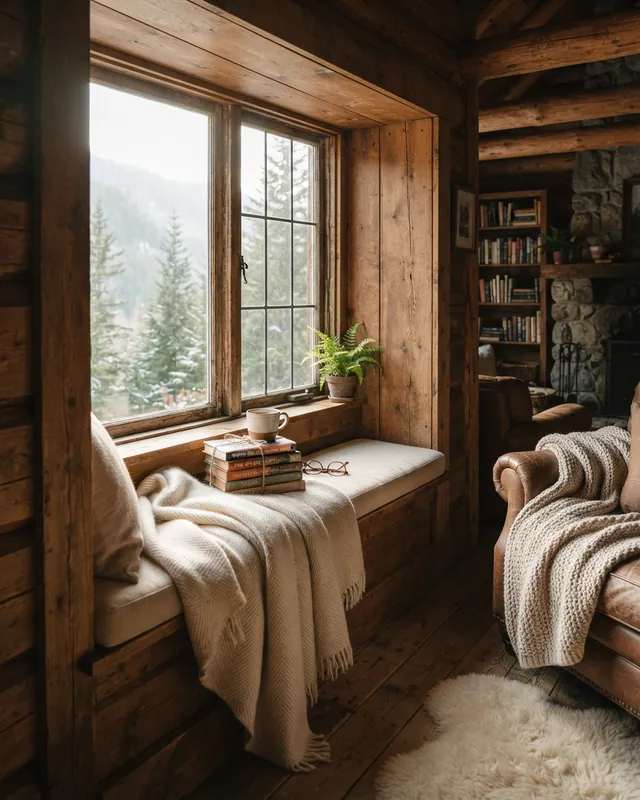
Interiors
Cabin reading nook
Prompt
Cozy reading nook in a timber cabin, morning light streaming through the window onto a wool throw and stacked books
- Style
- Editorial
- Ratio
- 4:5
The Editorial style adds: “editorial magazine photography, refined composition, natural tones”
What to notice
The prompt names the nook, the morning light, a wool throw and stacked books. The model arranged the rest: a fern on the sill, a mug, reading glasses on the cushion, a leather armchair and shelves of books against a stone wall, with snowy pines outside.
Style 5 of 6
Illustration: when a photo style is the wrong choice
Choose Illustration when the subject could never be photographed, or when you want artwork rather than realism: fantasy places, concept art and imagined worlds. The Illustration style adds “detailed digital illustration, harmonious color palette, clean shapes”, which asks for digital artwork instead of a camera image.
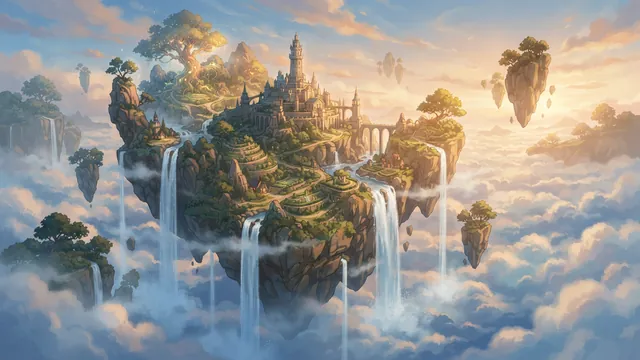
Concepts
Floating island concept
Prompt
Concept art of a floating island with waterfalls spilling into a sea of clouds, soft afternoon light
- Style
- Illustration
- Ratio
- 16:9
The Illustration style adds: “detailed digital illustration, harmonious color palette, clean shapes”
What to notice
The prompt opens with “Concept art”, so the subject and the style's words agree. The model added a hilltop castle, terraced slopes and smaller floating islands that the prompt never mentioned.
A photo style would ask for the opposite. The Photorealistic words begin with “photorealistic photograph”, which sends mixed instructions alongside a prompt that opens with “Concept art”. When the subject is invented, ask for art. When you need something that could pass for a real photo, Illustration is the wrong choice: use Photorealistic or Editorial.
Style 6 of 6
No style: when your prompt already says how it should look
Choose No style when your prompt already contains its own style words, or when you want full control over every word. With No style, AIPhoto-Generator sends your prompt to the model as you wrote it and adds nothing.
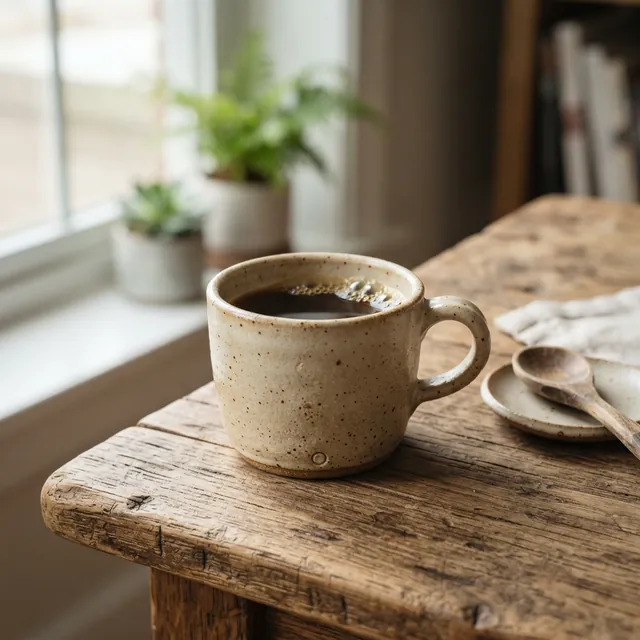
E-commerce
Handmade ceramic cup
Prompt
A small handmade ceramic cup on a wooden table, soft daylight, photorealistic photograph
- Style
- No style
- Ratio
- 1:1
What to notice
This prompt brings its own style words: it ends with “photorealistic photograph”, typed by hand. The cup came back filled with coffee, beside a window with plants, details the prompt left open.
Why not pick Photorealistic as well?
With the Photorealistic style selected, the same prompt would reach the model like this:
Text the model would receive with Photorealistic
A small handmade ceramic cup on a wooden table, soft daylight, photorealistic photograph. photorealistic photograph, natural lighting, sharp focus, high detail
“Photorealistic photograph” would appear twice. No style keeps the prompt as written, so the words you chose are the only style words the model reads.
Quick guide
How to choose a style
Choose the style by what the image is for: Studio for a product on a backdrop, Cinematic for mood and drama, Editorial for styled interiors and lifestyle scenes, Photorealistic for natural realism, Illustration for fantasy and concept art, and No style when you write the style words yourself.
- A product on a plain or colored backdropStudio
- Mood and drama: night, rain, low sun, long shadowsCinematic
- Styled interiors and lifestyle scenesEditorial
- Natural, true-to-life realismPhotorealistic
- Fantasy, concept art or anything that could not be photographedIllustration
- Your own style words, already written into the promptNo style
Not sure? Start with Photorealistic, the default. If a result is close but not right, generate again before you switch styles. The same prompt gives a different image every time; the latte art example has two real results from one prompt. Every style is available in our AI photo generator you can try free, and switching style costs nothing extra: each image counts the same toward your free images (or your paid balance), whichever style you pick.
Try a style in the generatorPrompt vocabulary
Style words you can type yourself
You can write style words straight into your prompt, with any style or with No style. Every phrase below comes from a real example prompt and links to the image made from that prompt, on this page or on our AI photo prompts page.
Camera and framing
“85mm lens, shallow depth of field”
Portrait framing with the background out of focus. Golden hour portrait
“macro photograph”
An extreme close-up of something small. Dew on a leaf
“soft bokeh background”
Background highlights blurred into soft, round shapes. Dew on a leaf
“top-down photo”
The camera looks straight down at the subject. Latte art from above
“flat lay”
Objects arranged on a surface and seen from above. Skincare flat lay
Light and time of day
“golden hour, warm backlight”
A low, warm sun behind the subject. Golden hour portrait
“soft morning light”
Gentle light early in the day. Latte art from above
“morning light streaming through the window”
Light with a clear direction and a visible source. Cabin reading nook
“soft directional shadows”
Light described by its effect: soft shadows that fall one way. Sculptural ceramic vase
“long shadows”
A low sun that stretches shadows across the frame. Dunes at sunset
Atmosphere and texture
“mist drifting over the water”
Atmosphere and depth in a landscape. Alpine lake at dawn
“neon signs reflecting on wet pavement”
Colored light repeated by a wet surface. Rainy neon alley
“frozen water splash”
Motion stopped in mid-air, like a high-speed photo. Perfume with water splash
Medium
“concept art”
Artwork for an idea, not a photograph. Floating island concept
“photorealistic photograph”
Realism, written by hand. Pair it with No style. Handmade ceramic cup
Mixing looks
Can I combine two styles?
No. You pick one style per image, and AIPhoto-Generator adds that one phrase to your prompt. To mix two looks, choose No style and write the words for both yourself.
Stacking conflicting looks sends the model mixed instructions. Typing illustration words such as “concept art” with the Photorealistic style selected, for example, would send this:
Concept art prompt with Photorealistic selected
Concept art of a floating island with waterfalls spilling into a sea of clouds, soft afternoon light. photorealistic photograph, natural lighting, sharp focus, high detail
That text asks for concept art and a photorealistic photograph at the same time. We have not generated it, and because the two halves ask for different things, the result is hard to predict.
To mix on purpose, choose No style, copy the parts you want from the style table, and leave out anything that contradicts the rest. For a moody product shot, for example, you could borrow “dramatic lighting” from Cinematic and “seamless backdrop” from Studio, and describe the product yourself.