AI newsletter header generator: Newsletter header images for every issue
Describe the scene for the top of your newsletter, and AIPhoto-Generator makes a new image in about 5 seconds. Crop it to a wide strip, add your newsletter's name as live text in your email editor, and send.
Artwork only. It doesn't add your newsletter name or logo, build templates or send emails. Add the name as live text in your email editor.
- 3 free images
- No sign-up
- PNG download
Last updated
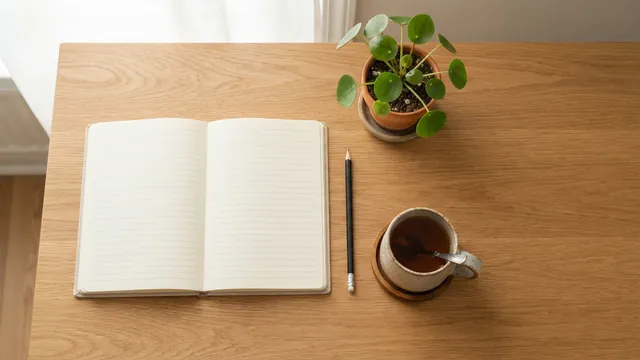
Real results from AIPhoto-Generator; the email frame is a mockup; the main image is cropped to a 3:1 strip and the others to 16:9. The main image's prompt: “Top-down view of a tidy oak desk with a blank open notebook, a pencil, a cup of tea and a small potted plant, soft daylight, empty space on the right side”
Shapes
Which shape to start from
There's no single newsletter header size, and no native banner shape here. Generate wide, then crop a strip in your email editor or an image editor.
16:9
Most email header images
1376 px wide: enough for a sharp header at 2× in 600 and 660 px emails, and for beehiiv's 1200 × 630 header. Crop a 3:1 to 5:1 strip for a slim banner.
Output: 1376 × 768 px · source: Mailchimp Help: image recommendations for content blocks
Try it at 16:93:2
Taller headers
Taller, for a 1200 × 630 header or a hero image. At 1264 px wide it's a little narrower than Mailchimp's 1320 px maximum.
Output: 1264 × 848 px · source: beehiiv Support: the Style panel
Try it at 3:2
Prompt ideas
Newsletter header prompts by topic
Each prompt keeps the interest on one side or in a band across the middle, so the image still works after you crop it to a wide strip.
Tech or SaaS newsletter
Abstract glowing circuit lines in soft blue across the right half of a dark navy background, the left half calm and empty, no text or logos
- Style
- Illustration
- Ratio
- 16:9
The calm left side sits beside your newsletter name.
Food or recipes
An overhead flat lay of fresh tomatoes, basil, garlic and olive oil on a pale stone counter, arranged in a band across the middle, soft daylight
- Style
- Photorealistic
- Ratio
- 16:9
A horizontal band of ingredients survives a slim crop.
Finance
A calm city skyline at dawn seen across still water, soft gold light, wide empty sky across the top, no recognizable landmarks, no text
- Style
- Photorealistic
- Ratio
- 16:9
A generic skyline avoids pointing at any real company.
Local or community news
A quiet tree-lined main street of small shops in early morning light, no people, no signs or lettering, no recognizable landmarks
- Style
- Editorial
- Ratio
- 16:9
“No signs or lettering” keeps made-up shop names out.
Personal essay or creator letter
A wooden desk by a rainy window with a cup of tea and a closed notebook, moody soft light, the right half calm and dark
- Style
- Cinematic
- Ratio
- 16:9
A personal, quiet mood for a letter-style newsletter.
School or classroom
Colorful pencils, crayons and paper on a light wooden table, overhead view, arranged along the bottom edge, bright cheerful light, no writing
- Style
- Photorealistic
- Ratio
- 16:9
Bright and simple for a class or parent newsletter.
Company or HR update
A bright office corner with a large potted plant and a white shelf, soft daylight, a plain light wall, no people, no logos, no text
- Style
- Photorealistic
- Ratio
- 16:9
Neutral enough for any internal update.
Church or community group
A row of lit candles on a wooden ledge with soft warm bokeh behind, calm and gentle, no symbols, no text
- Style
- Photorealistic
- Ratio
- 16:9
Warm and quiet, with room for the group's name.
Series
Seasonal and monthly header sets
Keep the same style and layout every issue and swap only the subject, so readers recognize the newsletter at a glance. Each image is generated separately, so results vary.
Four seasons
- Style
- Photorealistic
- Ratio
- 16:9
Shared phrase in every season: “overhead view on a pale wooden table, arranged in a band across the middle, soft daylight, empty space at the top and bottom, no text”
- Open season 1 in the generator
1Spring: cherry blossom sprigs and small green leaves, overhead view on a pale wooden table, arranged in a band across the middle, soft daylight, empty space at the top and bottom, no text
- Open season 2 in the generator
2Summer: lemons, sliced citrus and a straw hat, overhead view on a pale wooden table, arranged in a band across the middle, soft daylight, empty space at the top and bottom, no text
- Open season 3 in the generator
3Autumn: maple leaves, small pumpkins and a knitted scarf, overhead view on a pale wooden table, arranged in a band across the middle, soft daylight, empty space at the top and bottom, no text
- Open season 4 in the generator
4Winter: pine sprigs, pine cones and a mug of cocoa, overhead view on a pale wooden table, arranged in a band across the middle, soft daylight, empty space at the top and bottom, no text
Monthly issues
- Style
- Illustration
- Ratio
- 16:9
Shared phrase in every month: “flat illustration, soft muted colors, one scene centered in a wide horizontal band, plain cream background, no text or numbers”
- Open month 1 in the generator
1January: a snowy cabin with smoke rising from the chimney, flat illustration, soft muted colors, one scene centered in a wide horizontal band, plain cream background, no text or numbers
- Open month 2 in the generator
2April: an umbrella and spring rain over a row of tulips, flat illustration, soft muted colors, one scene centered in a wide horizontal band, plain cream background, no text or numbers
- Open month 3 in the generator
3July: a beach umbrella beside calm sea waves, flat illustration, soft muted colors, one scene centered in a wide horizontal band, plain cream background, no text or numbers
- Open month 4 in the generator
4October: a small pumpkin patch under a full moon, flat illustration, soft muted colors, one scene centered in a wide horizontal band, plain cream background, no text or numbers
Examples
Real results that crop into headers
Real images from AIPhoto-Generator, each with the exact prompt that made it. None was made as a header, but each crops well into a wide strip.
A top-down desk with space on the right: it crops to a tidy 3:1 strip.
Prompt: Top-down view of a tidy oak desk with a blank open notebook, a pencil, a cup of tea and a small potted plant, soft daylight, empty space on the right side
Real result · Photorealistic · made at 16:9 · about this image: Desk flat lay header
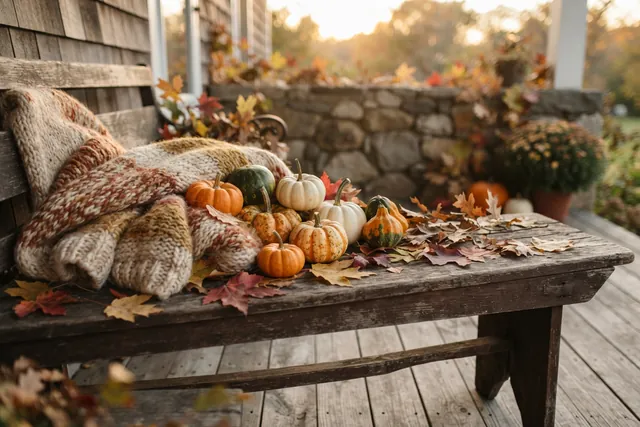
A seasonal still life for an autumn issue.
Prompt: Autumn still life on a wooden porch bench: small pumpkins, a knitted wool blanket and fallen maple leaves, nothing else on the bench, soft late-afternoon light
Real result · Editorial · made at 3:2 · about this image: Autumn porch still life
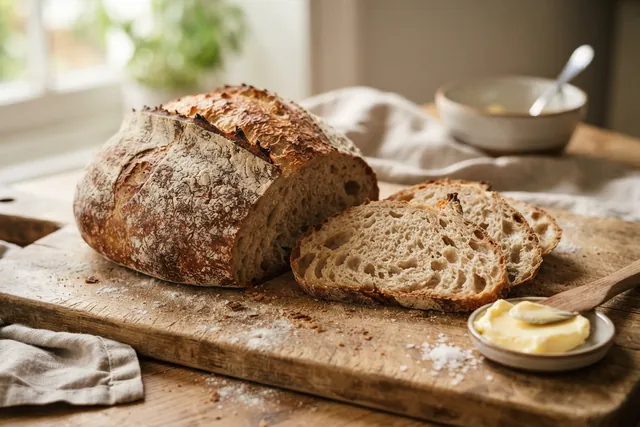
A food scene for a recipe newsletter; crop the middle band.
Prompt: Rustic sourdough loaf with a crackled crust, two slices cut on a wooden board with a dish of butter, light dusting of flour, warm side light
Real result · Photorealistic · made at 3:2 · about this image: Sourdough loaf
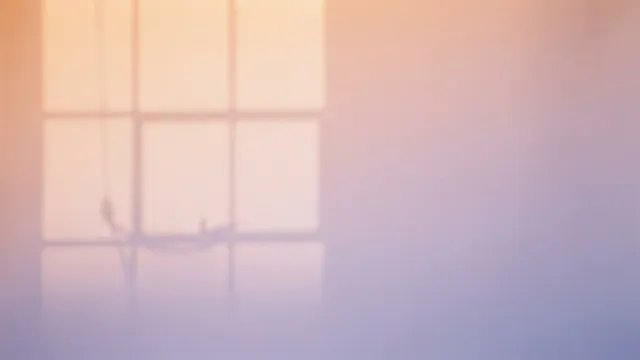
A soft gradient: a calm banner behind a live-text name.
Prompt: Soft gradient of warm peach to lavender light on a seamless paper backdrop with the faint shadow of a window frame, minimal abstract background, photograph
Real result · No style · made at 16:9 · about this image: Peach and lavender backdrop
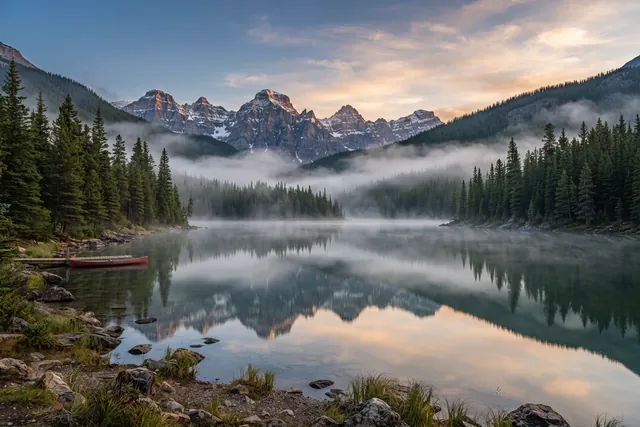
A landscape with a horizontal band of detail that suits a slim crop.
Prompt: Still alpine lake at dawn, mist drifting over the water, pine-covered mountains mirrored on the surface
Real result · Photorealistic · made at 3:2 · about this image: Alpine lake at dawn
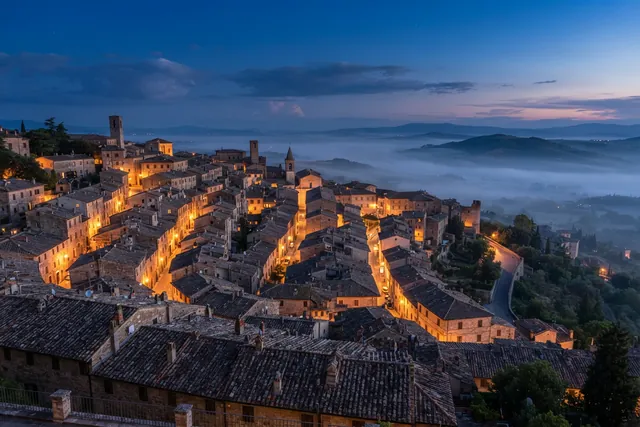
A dusk town view for a local or travel newsletter.
Prompt: Terracotta rooftops of an old hillside town at blue hour, warm lights in a few windows, soft mist in the valley beyond
Real result · Photorealistic · made at 3:2 · about this image: Hillside rooftops at blue hour
Sizes
Email header image sizes by platform
Checked on 11 October 2026 against each platform's help pages. Most email bodies are 600–660 px wide, so a header uploaded at about twice that stays sharp on high-resolution screens.
| Platform | What its help pages say | From our images |
|---|---|---|
| Mailchimp (new builder) | Templates are 660 px wide; images 660–1320 px wide; 1 MB or less recommended | 16:9 (1376 px wide) covers 1320; save a JPG copy to get under 1 MB |
| Mailchimp (legacy builder) | Templates are 600 px wide; images 600–1200 px wide | Both 16:9 and 3:2 cover 1200 |
| Substack email banner | 1100 × 220 PNG recommended, with a transparent background, and it “could be taller”; banners show only in emails | Crop 16:9 to 1376 × 275, then resize to 1100 × 220. Ours aren't transparent |
| beehiiv email header | 1200 × 630 recommended; uploads under 5 MB | Crop 16:9 to 1376 × 722 (or 3:2 to 1264 × 664), then resize to 1200 × 630 |
| Klaviyo | Full-width images 600–1000 px wide; 1 MB or less recommended (10 MB maximum); insert at 2× and always add alt text | 16:9 covers 2× for a 600 px header |
| Kit | Default templates are 600 px wide | 16:9 covers 2× (1200 px) |
Sources: Mailchimp Help: image recommendations for content blocks · Substack Help: image dimensions for your publication · Substack Help: edit email headers and footers · beehiiv Support: the Style panel · beehiiv Support: thumbnails, images and GIFs · Klaviyo Help: about email images · Kit Help: default HTML email templates
Crops
Crop recipes for wide headers
There are no native banner shapes, so crop a strip from the middle of a wide image. Keep the subject centered and the edges quiet.
| Crop | From 16:9 (1376 × 768) | From 3:2 (1264 × 848) |
|---|---|---|
| 2:1 | 1376 × 688 px | 1264 × 632 px |
| 3:1 | 1376 × 459 px | 1264 × 421 px |
| 4:1 | 1376 × 344 px | 1264 × 316 px |
| 5:1 | 1376 × 275 px | 1264 × 253 px |
| 1200 × 630 shape | 1376 × 722 px | 1264 × 664 px |
In the inbox
Make the header work in every inbox
- Put the newsletter name in live text too: some email apps hide images until the reader allows them.
- Add alt text that names the newsletter and describes the picture. Klaviyo says to always add it.
- Save a JPG copy: our PNGs are usually 1.1–2.2 MB, and Mailchimp and Klaviyo recommend 1 MB or less.
- Upload at about twice the display width (1200 px for a 600 px email) so it stays sharp on high-resolution screens.
- Our images are opaque, so no transparent edges vanish in dark mode. Still, send yourself a test in a dark-mode email app.
- Keep the subject large and centered, so it still reads when phones show the header smaller.
Sources: Mailchimp Help: troubleshooting images in campaigns · Klaviyo Help: about email images
How it works
How to make a newsletter header image
Your first 3 images are free, and you don't need an account for them.
- 01
Pick 16:9 and describe it
Keep the subject in a band across the middle, with quiet space where the name will sit.
- 02
Generate and crop
Download the PNG, crop a strip and save a JPG copy under 1 MB.
- 03
Add it in your editor
Upload it as the header in Mailchimp, Substack, beehiiv, Kit or Klaviyo, add the name as live text and write alt text.
Tips
Tips for newsletter headers
Same look every issue
A consistent header helps readers recognize your newsletter. Change the subject, not the style.
Crop before you judge
An image that looks busy at 16:9 often works as a slim strip.
Soft edges
Pure white edges can blend into the email background; a soft tone frames the header.
Mind the file size
Large images load slowly on phones. Aim for 1 MB or less.
Send a test
Look at the email on a phone and in dark mode before it goes to your list.
Good to know
What it doesn't do
Text and logos
It doesn't add your newsletter name, issue number or logo.
Templates and sending
No email templates, no sending and no connection to Mailchimp or Substack.
Banner shapes
There's no 3:1 or 5:1 output; you crop a wide image.
Transparency
Images are opaque PNGs, so Substack's transparent banner isn't possible.
Resolution
About 1 megapixel: 1376 px wide at 16:9, enough for a 2× header in 600 and 660 px emails.
FAQ
Questions about the AI newsletter header generator
More answers on the main FAQ and the pricing page.
What size should an email header image be?
There's no single standard. Most email bodies are 600 px wide (Mailchimp's legacy builder and Kit's default templates), and Mailchimp's new builder is 660 px. Upload at about twice the width, 1200–1320 px, and pick the height for your design: slim strips are often 3:1 to 5:1. Our 16:9 images are 1376 px wide.
What size is a Substack email banner?
Substack recommends 1100 × 220 px as a PNG with a transparent background, and says it could be taller. Crop a 16:9 image to 1376 × 275, resize it to 1100 × 220 and save it as PNG. Our images aren't transparent, so the banner will be a solid picture.
What size is a beehiiv email header?
1200 × 630 px, set in the Style panel. Crop a 16:9 image to 1376 × 722 (or a 3:2 image to 1264 × 664) and resize it to 1200 × 630. Uploads must be under 5 MB.
What size is a Mailchimp header image?
Images in Mailchimp's new builder can be 660–1320 px wide, and 600–1200 px in the legacy builder; Mailchimp recommends 1 MB or less. Use 16:9 here: at 1376 px wide it covers 1320, and 3:2 (1264 px) doesn't.
Can it add my newsletter name or logo?
No. Lettering inside AI images is unreliable, and logos can't be generated. Ask for empty space in the prompt, then add the name as live text in your email editor.
Should the header be an image or live text?
Both: an image for the mood and live text for the name. Some email apps hide images until the reader allows them, so the name and key message should still read without the picture.
JPG or PNG?
Downloads are PNG, usually 1.1–2.2 MB. Mailchimp and Klaviyo recommend images of 1 MB or less, so save a JPG copy of a photographic header. Substack recommends PNG for its banner.
How do I keep the header sharp on retina screens?
Upload it at about twice the size it's shown. Klaviyo recommends inserting images at 2×, and Mailchimp's widths go up to 1320 px for a 660 px template. Our 1376 px wide image covers both.
Will the header work in dark mode?
Our images are opaque, so nothing disappears into a dark background. Email apps handle dark mode differently, so send yourself a test.
Is this about email message headers (From, Received, DKIM)?
No. This page makes the picture at the top of a newsletter. To read the technical headers of an email message, use a message header analyzer, such as the one Microsoft provides.
Can I use the headers in a paid or business newsletter?
Generated images can be used under our Terms of Service and the AI model provider's terms; read both before commercial use. We don't claim ownership of your images, and copyright protection for AI images varies by country. Don't recreate other brands' logos or artwork, which our Acceptable Use Policy doesn't allow.
Is the newsletter header generator free?
It's free to try: your first 3 images are free, with no account, and they don't reset. At busy times, free capacity for the whole site can run out. After that, generating uses paid images from an image pack or the Pro plan. Paid plans allow up to 4 images per prompt, and each image uses one paid image. See pricing.
What else can I make for email and the web?
For the image at the top of blog posts and link previews, use the blog featured image generator. For printed or emailed gift cards, use the gift card generator.
More ways to use the generator
- Blog featured image generator16:9 featured images that also work as link previews and in Google Discover.
- AI gift card generatorArtwork for printed and emailed gift cards, ready for your text, name and amount.
- AI social media image generatorImages for feeds, headers, thumbnails and Stories, with a shape for every kind of post.
- AI presentation background generatorSoft 16:9 slide backgrounds for PowerPoint, Google Slides, Keynote and Canva.
Guides for this
- AI stock photos for blogsOriginal header and in-article images from a prompt, with alt-text tips and licensing notes.
- AI photo promptsEvery prompt shown next to the real image it produced, with its style and aspect ratio.
- AI image aspect ratiosHow to choose the right shape for an AI image, with the output size of each of the six ratios.
Start creating
Your next image is one sentence away.
Describe it, generate it, download it. Your first 3 images are free, no account needed.