AI PFP generator: A profile picture from a description
Describe the avatar you want, a character, an animal, a mood or an object, and AIPhoto-Generator makes a new square image for it, usually in about 5 seconds.
It makes new avatar-style images from text. It can't use your photo, so it won't make a picture of you. For a real headshot, use a real photo.
- 3 free images
- No sign-up
- PNG download
Last updated
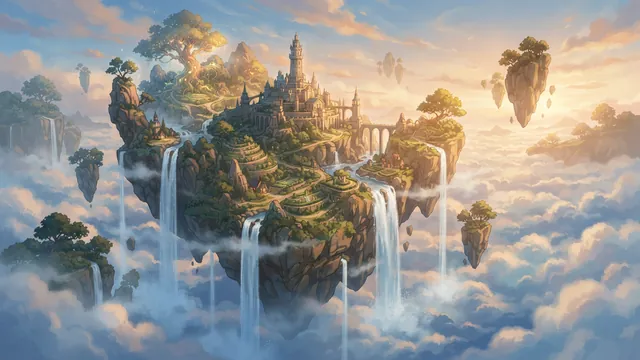
Real results from AIPhoto-Generator, cropped to a circle like a profile picture. The main image's prompt: “Concept art of a floating island with waterfalls spilling into a sea of clouds, soft afternoon light”
Shapes
The right size for a profile picture
Profile pictures are square, and most apps show them as a circle.
1:1
Profile picture
Square. Most apps crop it to a circle, so keep the face or subject in the middle with space around it.
Output: 1024 × 1024 px
Try it at 1:116:9
Matching header or banner
Reuse the same colors and style words to make a wide header that goes with your pfp.
Output: 1376 × 768 px
Try it at 16:9
Prompt ideas
PFP prompts to start from
Each prompt opens in the generator at 1:1 with its style set. Change the animal, colors or mood to make it yours.
Illustrated animal avatar
A friendly illustrated fox wearing a green scarf, head and shoulders, centered, soft pastel background
- Style
- Illustration
- Ratio
- 1:1
A clear face and a plain background read well even at tiny sizes.
Gaming avatar
A knight's helmet with glowing blue eyes in a dark forge, dramatic rim light, head-on, centered
- Style
- Illustration
- Ratio
- 1:1
High contrast keeps the shape readable in a small circle.
Invented person, realistic
Head-and-shoulders portrait of an invented young man with curly hair and a denim jacket, smiling, soft window light, plain warm grey background
- Style
- Photorealistic
- Ratio
- 1:1
An invented face, not a real person: fine for a character or a placeholder.
Aesthetic flower
A single pink peony in a glass of water on a windowsill, soft morning light, pastel tones, centered
- Style
- Photorealistic
- Ratio
- 1:1
Soft colors and one subject make a calm, aesthetic pfp.
Cute mascot
A round, cheerful robot mascot with big eyes and a smooth white shell, centered, light blue background
- Style
- Illustration
- Ratio
- 1:1
Simple shapes work for a brand, a club or a Discord server.
Cat with glasses
A fluffy orange cat wearing tiny round glasses, close-up portrait, soft studio light, plain mint background
- Style
- Studio
- Ratio
- 1:1
A playful, invented animal that doesn't need to look like your pet.
Abstract glow
A soft glowing orb of peach and lavender light on a dark background, simple and centered
- Style
- No style
- Ratio
- 1:1
For a minimal account that doesn't want a face at all.
Cozy scene
A tiny wooden cabin with glowing windows in a snowy forest at night, centered, cozy and calm
- Style
- Illustration
- Ratio
- 1:1
A small scene with one bright spot that draws the eye.
Examples
Real results, cropped like a profile picture
These real images from AIPhoto-Generator are shown in a circle, the way most apps display profile pictures. Most were made at other shapes for other pages; for a pfp, run your prompt at 1:1.
Illustration style: a fantasy scene that stays readable in a circle.
Prompt: Concept art of a floating island with waterfalls spilling into a sea of clouds, soft afternoon light
Real result · Illustration · made at 16:9 (cropped here) · about this image: Floating island concept
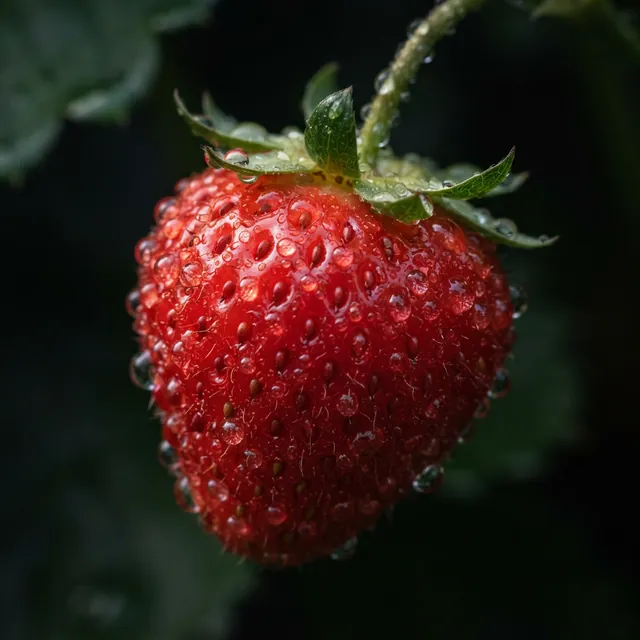
One bold subject on a dark background: strong even at tiny sizes.
Prompt: Macro photograph of a fresh strawberry covered in water droplets against a dark background, crisp detail
Real result · Photorealistic · made at 1:1 (cropped here) · about this image: Strawberry macro
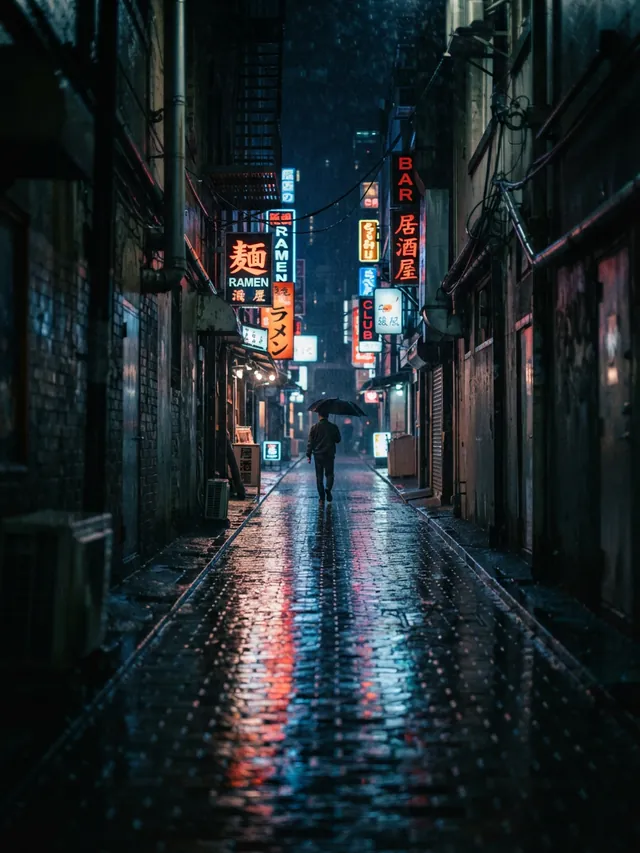
A moody, cinematic look for a gaming or music account.
Prompt: Rain-soaked city alley at night, neon signs reflecting on wet pavement, a lone figure with an umbrella in the distance
Real result · Cinematic · made at 3:4 (cropped here) · about this image: Rainy neon alley
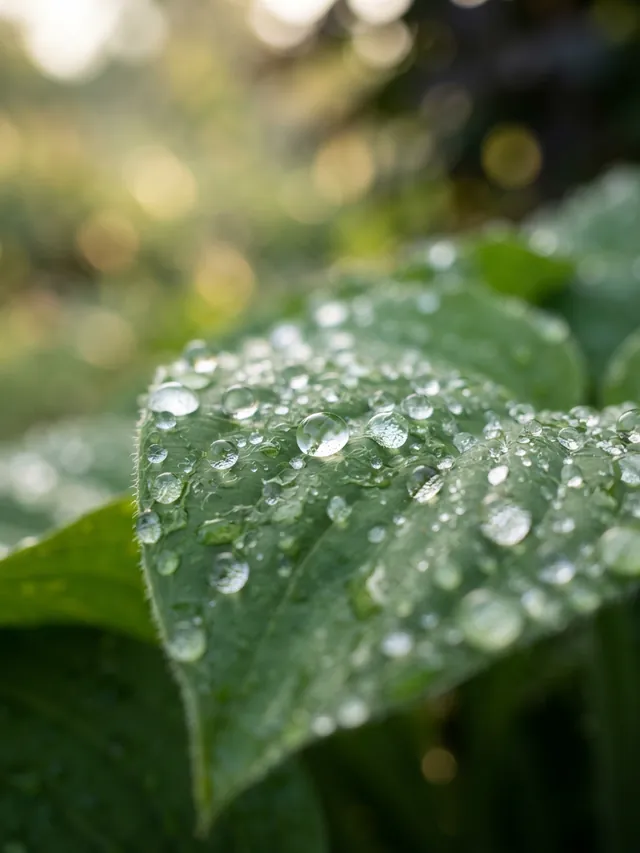
A calm nature close-up for an aesthetic profile.
Prompt: Macro photograph of dew drops on a green leaf, soft bokeh background, early morning
Real result · Photorealistic · made at 3:4 (cropped here) · about this image: Dew on a leaf
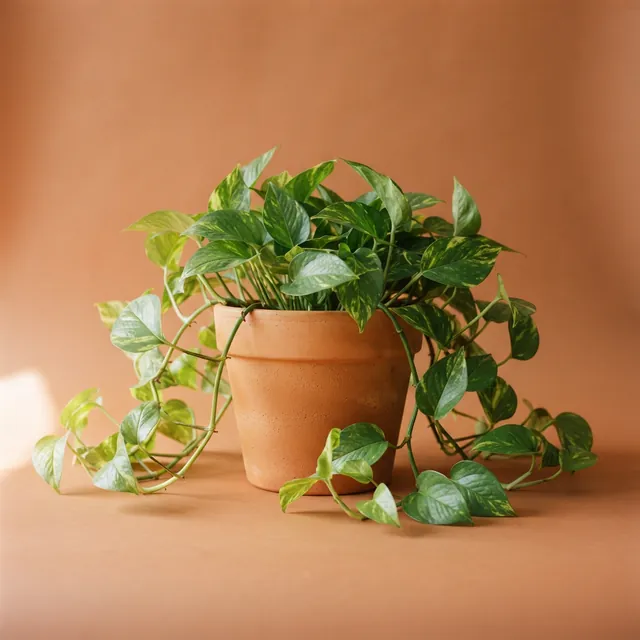
A single object on a warm backdrop: simple and recognizable.
Prompt: A terracotta pot with a trailing pothos plant on a terracotta-colored backdrop, soft warm side light, minimal composition
Real result · Studio · made at 1:1 (cropped here) · about this image: Carousel 1: trailing plant
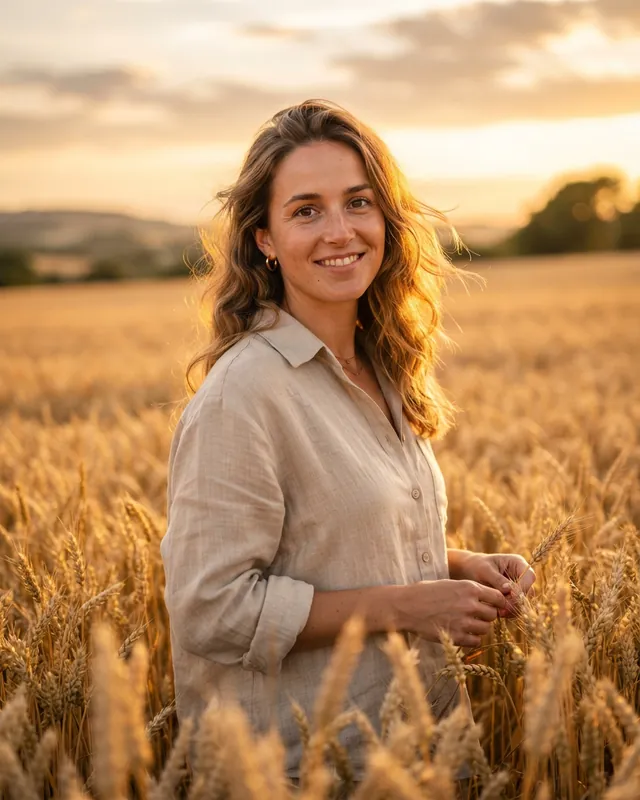
An invented person, not a photo of anyone: a realistic face suits a character, not a picture of you.
Prompt: Portrait of a woman in a linen shirt standing in a wheat field at golden hour, warm backlight, 85mm lens, shallow depth of field
Real result · Photorealistic · made at 4:5 (cropped here) · about this image: Golden hour portrait
How it works
How to make an AI profile picture
Your first 3 images are free, and you don't need an account for them.
- 01
Describe the avatar
Who or what it is, the expression or mood, and a plain background. Ask for it centered.
- 02
Pick a style at 1:1
Illustration for avatars and mascots, Photorealistic or Studio for realistic looks.
- 03
Download and upload
Save the PNG and upload it to your profile; the app will crop it, usually to a circle.
Tips
Tips for a good pfp
Center it with a margin
Circle crops cut the corners. Keep the face or subject in the middle with space around it.
Big shapes, few details
Profile pictures show tiny. A clear silhouette beats fine detail.
Plain backgrounds read most clearly
Ask for a soft or single-color background so the subject stands out.
Make a matching set
Keep the same character words and change only the expression or background. Each image is new, so the character will look a little different every time: there's no seed or reference image.
Invent, don't copy
Describe your own character. Our Acceptable Use Policy forbids copyrighted characters and misleading or harmful images of real people.
Good to know
What it doesn't do
Your photo
There's no photo upload, so it can't turn you, your face or your pet into an avatar.
Transparent backgrounds
Images always come with a background; there's no transparent option.
Animated pfps
It makes still images only.
Real people and characters
Our Acceptable Use Policy forbids copyrighted characters and misleading, sexual, defamatory or harmful images of real, identifiable people. Describe a character of your own.
Can it turn my photo into a pfp?
No. AIPhoto-Generator is text to image only: it can't upload or edit a photo, so it can't make a picture of you. It makes new avatars, characters and aesthetic images from a description. Text-to-image vs image-to-image explains the difference.
What size is a profile picture?
Square. Generate at 1:1, which gives 1024 × 1024 px. Most apps then show it as a circle, so keep the subject centered with some space around it.
Can I make an anime-style or cartoon pfp?
Yes, with the Illustration style: describe the look you want, for example big expressive eyes, clean line art and soft shading. Describe your own character rather than naming an existing one. The styles guide shows what each style adds.
Can I make a pfp of a celebrity or a game character?
Please don't. Our Acceptable Use Policy forbids copyrighted characters, impersonation, and misleading or harmful images of real, identifiable people. Invent a character instead.
Will it work on Discord, X, Instagram or TikTok?
Most apps accept a square image for a profile picture. Download the PNG, upload it in the app's profile settings and adjust the crop there.
Is the pfp generator free?
It's free to try: your first 3 images are free, with no account, and they don't reset. At busy times, free capacity for the whole site can run out. After that, generating uses paid images from an image pack or the Pro plan. Paid plans allow up to 4 images per prompt, and each image uses one paid image. See pricing.
More ways to use the generator
- AI Instagram post generatorFeed post, square and Story images from a prompt, with ready-to-run Instagram prompts.
- AI social media post generatorImages for feeds, headers, thumbnails and Stories, with a shape for every kind of post.
- AI carousel post makerMatching images for every slide of a carousel, from prompts that share the same look.
- AI gift card generatorArtwork for printed and emailed gift cards, ready for your text, name and amount.
Guides for this
- AI photo styles comparedThe exact words each of the six styles adds to your prompt, with a real example of each.
- AI photo promptsEvery prompt shown next to the real image it produced, with its style and aspect ratio.
- AI image aspect ratiosHow to choose the right shape for an AI image, with the output size of each of the six ratios.
Start creating
Your next image is one sentence away.
Describe it, generate it, download it. Your first 3 images are free, no account needed.