AI Instagram post generator: Instagram post images from one sentence
Describe the post you have in mind, pick a feed or Story shape, and AIPhoto-Generator makes a brand-new image for it, usually in about 5 seconds. Copy one of the Instagram prompts below or write your own.
It makes a still picture only. It doesn't post to Instagram, make Reels videos, write captions or hashtags, or add text, and it can't use a photo you upload. Add your words in Instagram or an editing app.
- 3 free images
- No sign-up
- PNG download
Last updated
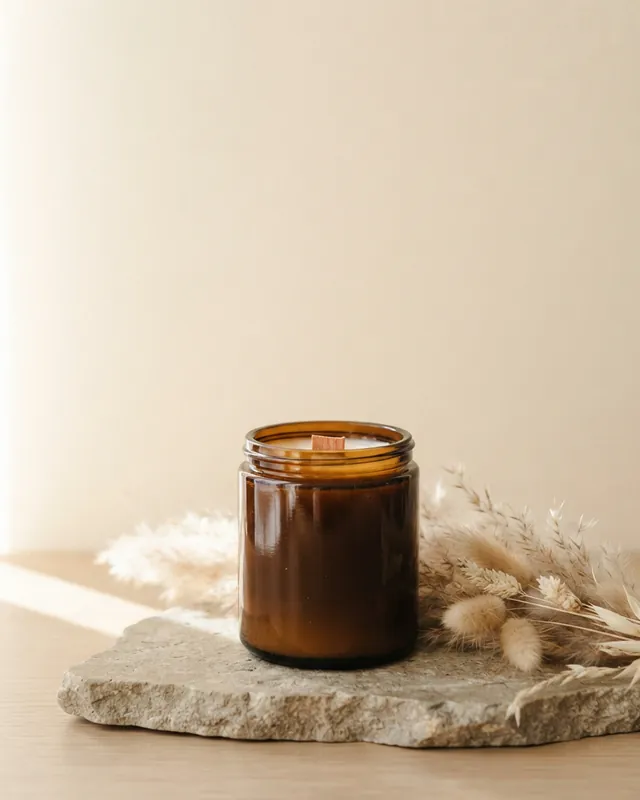
Real results from AIPhoto-Generator. The main image's prompt: “Amber glass candle jar with a wooden wick on a stone slab, dried pampas grass beside it, warm side light, plain cream backdrop with empty space in the upper half”
Shapes
Which shape to pick for Instagram
Choose the shape before you generate: each image is made at one aspect ratio.
4:5
Feed post (portrait)
Takes up more of the feed than a square. Instagram keeps feed photos between 1.91:1 and 3:4 without cropping, and 4:5 sits inside that range.
Output: 928 × 1152 px · source: Instagram Help Center: image resolution of photos you share
Try it at 4:51:1
Square feed post
Inside the same feed range, and the easiest shape for single products and quote backgrounds.
Output: 1024 × 1024 px · source: Instagram Help Center: image resolution of photos you share
Try it at 1:13:4
Tall feed post
For the most height in the feed: 3:4 is the tallest feed shape on Instagram's help page.
Output: 896 × 1200 px · source: Instagram Help Center: image resolution of photos you share
Try it at 3:49:16
Story or Reel
Full-screen and vertical. Instagram accepts reels from 1.91:1 to 9:16 and recommends 420 × 654 pixels (1:1.55) for cover photos, a shorter shape than 9:16, so keep the subject near the middle.
Output: 768 × 1376 px · source: Instagram Help Center: Reel size and aspect ratios
Try it at 9:16
Prompt ideas
Instagram post prompts to start from
Each prompt opens in the generator with its style and shape already set. Change the subject and colors to fit your account.
Product flat lay with space for text
Flat lay of a linen tote bag, a plain closed notebook and sunglasses on warm beige paper, soft daylight, plenty of empty space on the right
- Style
- Studio
- Ratio
- 4:5
The prompt asks for empty space on the right for a price or a short line added later.
Café drink
An iced matcha latte in a clear glass on a white marble café counter, morning sun, shallow depth of field
- Style
- Photorealistic
- Ratio
- 4:5
Simple, bright and close: it still reads at feed size.
Quote post background
Soft sage-green linen fabric filling the frame, gentle folds, even diffused light, no objects
- Style
- No style
- Ratio
- 1:1
A quiet texture to type a quote over in your editor.
Launch or announcement
A single gift box wrapped in kraft paper with a cotton ribbon on a pastel blue backdrop, centered, lots of empty space above
- Style
- Studio
- Ratio
- 4:5
Leaves room for “New in” or “Coming soon” added on top.
Travel post
A whitewashed island alley with bright blue doors and pink bougainvillea, late afternoon light, no people
- Style
- Editorial
- Ratio
- 4:5
Editorial style keeps the colors natural and the framing calm.
Fitness post
A pair of plain unbranded running shoes and a water bottle on an empty running track at sunrise, long shadows, fresh and energetic
- Style
- Photorealistic
- Ratio
- 4:5
Objects instead of people keep the image believable and easy to reuse.
Story background
A misty pine forest at dawn seen from a quiet trail, soft light, empty pale sky at the top
- Style
- Photorealistic
- Ratio
- 9:16
The open sky leaves room for a Story sticker, poll or headline.
Seasonal post
Autumn leaves, a lit candle and a knitted blanket on a wooden table, warm cozy evening light
- Style
- Editorial
- Ratio
- 1:1
Swap the season words to make a matching post for any time of year.
Examples
Real results for Instagram
These are real images from AIPhoto-Generator, each shown with the exact prompt, style and shape that made it.
A 4:5 feed post with the upper half left empty for text.
Prompt: Amber glass candle jar with a wooden wick on a stone slab, dried pampas grass beside it, warm side light, plain cream backdrop with empty space in the upper half
Real result · Studio · made at 4:5 · about this image: Candle with space for text
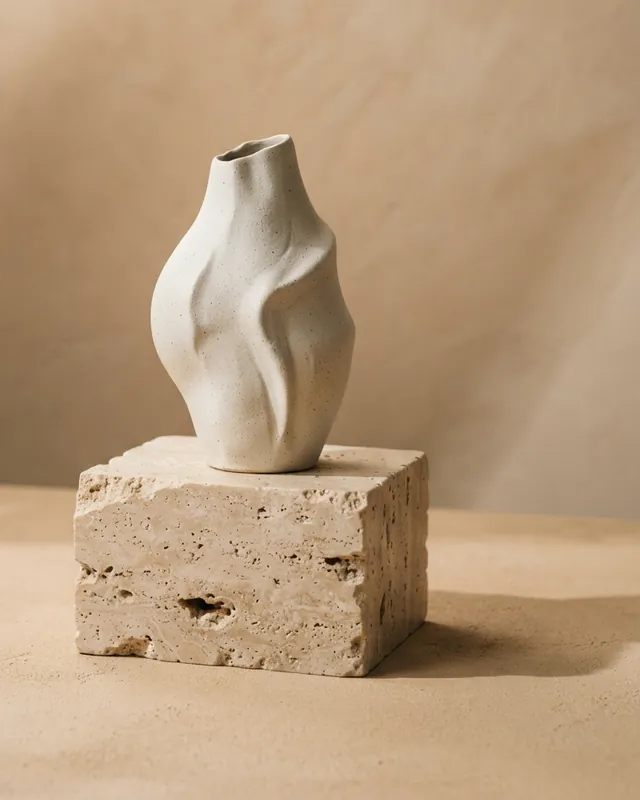
A single product on a plain warm backdrop: simple enough to read at feed size.
Prompt: Minimal sculptural ceramic vase on a travertine block, soft directional shadows, warm beige studio backdrop
Real result · Studio · made at 4:5 · about this image: Sculptural ceramic vase
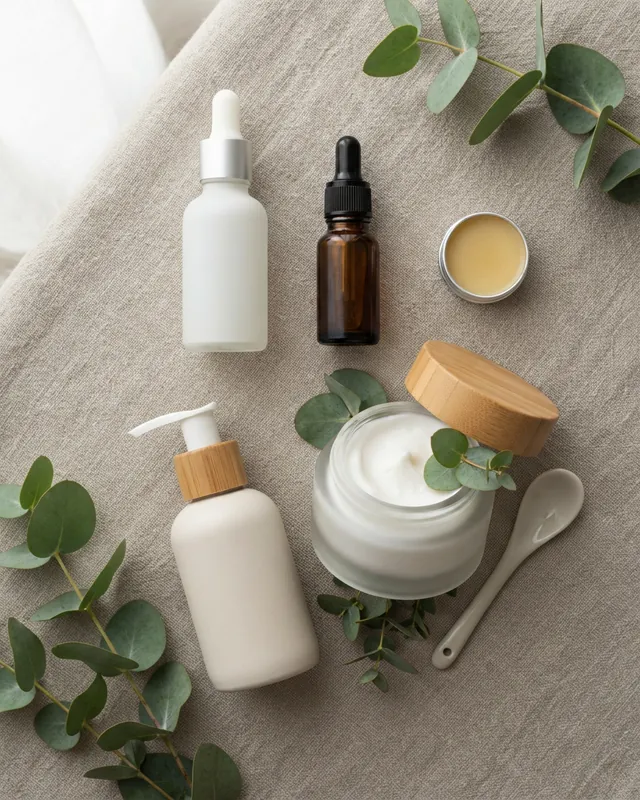
The prompt asks for blank, unlabeled packaging, and the bottles came back with no printed names.
Prompt: Flat lay of minimalist skincare bottles with blank, unlabeled packaging and a frosted jar with eucalyptus sprigs on natural linen, soft daylight
Real result · Studio · made at 4:5 · about this image: Skincare flat lay
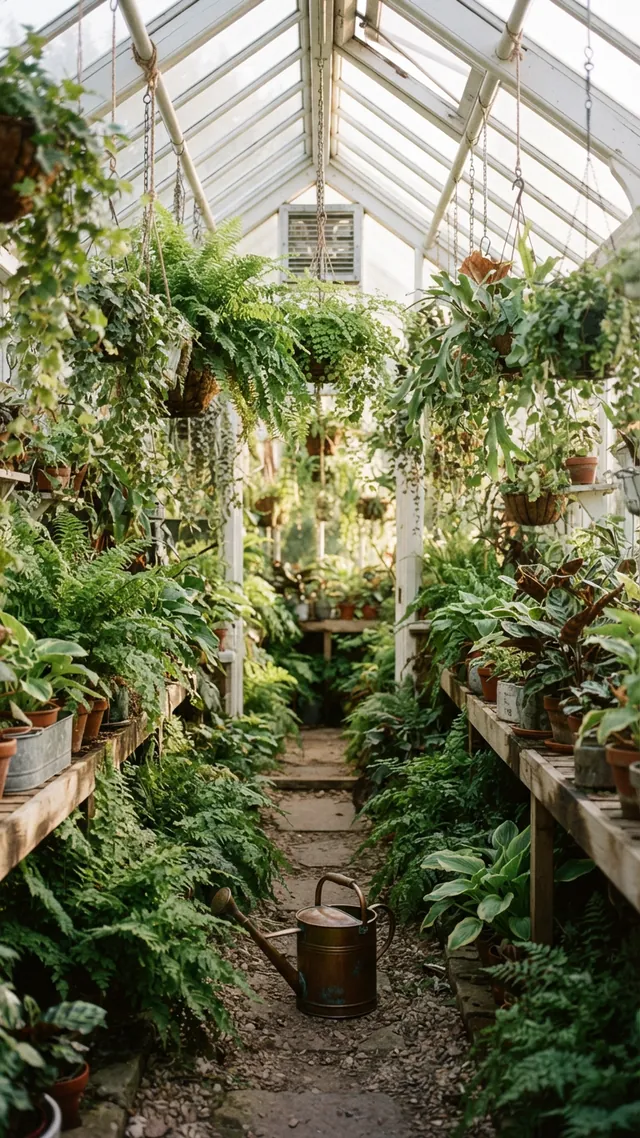
A 9:16 Story: the aisle leads the eye up the middle of the frame, and leaves fill the edges.
Prompt: A narrow greenhouse aisle lined with ferns and hanging plants, morning light through the glass roof, a watering can on the path
Real result · Editorial · made at 9:16 · about this image: Greenhouse aisle
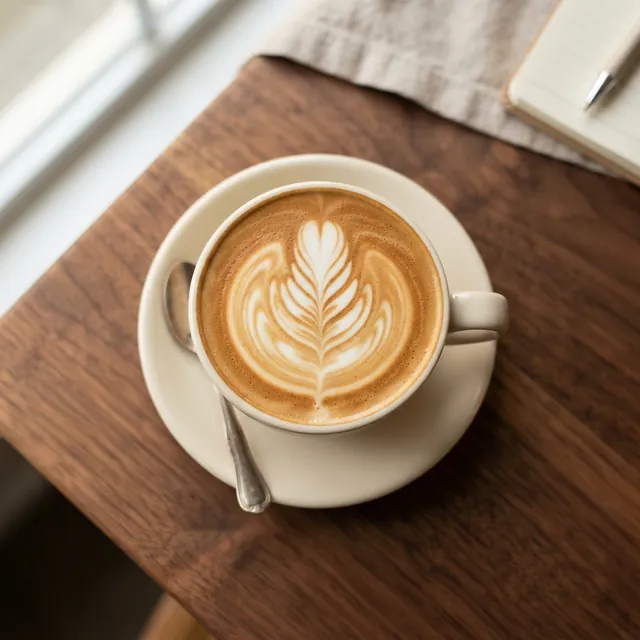
A square top-down shot for a feed post.
Prompt: Top-down photo of a latte with rosetta latte art on a walnut table, soft morning light
Real result · Photorealistic · made at 1:1 · about this image: Latte art from above
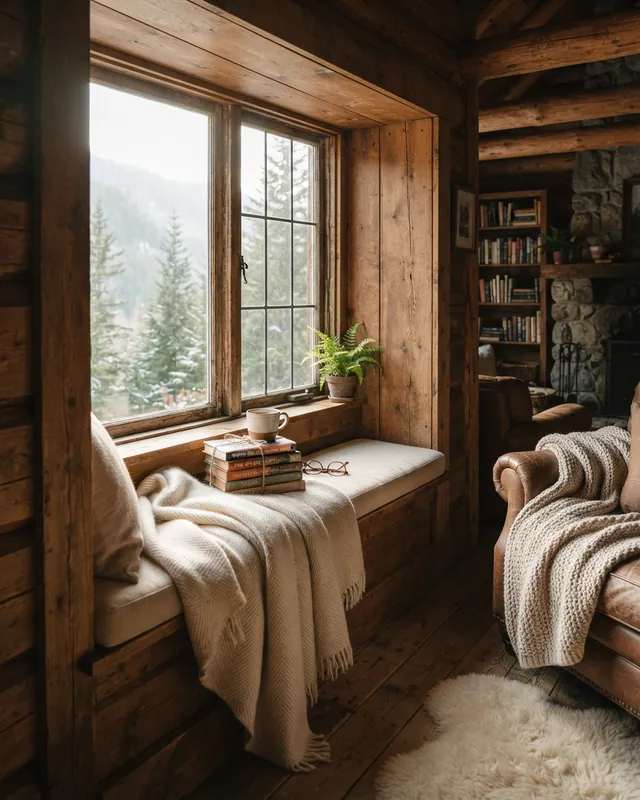
A cozy lifestyle scene with no people, in window light.
Prompt: Cozy reading nook in a timber cabin, morning light streaming through the window onto a wool throw and stacked books
Real result · Editorial · made at 4:5 · about this image: Cabin reading nook
How it works
How to make an Instagram post image
Your first 3 images are free, and you don't need an account for them.
- 01
Pick the shape
4:5 for most feed posts, 1:1 for squares, 9:16 for Stories and Reels.
- 02
Describe the post
Name the subject, the setting and the light. If you'll add text, say where to leave empty space.
- 03
Generate and post
Download the PNG, add your caption and any text in Instagram or an editor, then post it.
Tips
Tips for Instagram images
Leave room for text
Lettering inside AI images is unreliable, so ask for empty space (“plain wall at the top”) and add words afterwards.
Keep your grid consistent
Reuse the same backdrop, light and color words in every prompt, so posts look like they belong together.
Match the style to the post
Studio for products on plain backdrops, Photorealistic for lifestyle, Editorial for calm magazine-like scenes, Illustration for graphic posts.
Make the Story separately
A prompt run at 9:16 gives a new image, not a crop of your feed post. Crop the feed image instead if the two must match exactly.
Check the details before you post
Look at hands, small objects and edges at full size. Generate again if something looks off.
Good to know
What it doesn't do
Posting and scheduling
It doesn't connect to Instagram. Download the image and post it yourself.
Captions and hashtags
It makes images only; it doesn't write captions.
Your own photos
It works from text alone, so it can't place your real product in a scene.
Text and templates
There are no fonts or post templates. Add text in Instagram or a design app.
Video
It makes still images only: no Reels, Shorts, Story videos or animation.
FAQ
Questions about the AI Instagram post generator
More answers on the main FAQ and the pricing page.
What size should an AI image for an Instagram post be?
Use 4:5 for most feed posts, 1:1 for squares and 9:16 for Stories and Reels. Instagram keeps feed photos between 1.91:1 and 3:4 without cropping. AIPhoto-Generator makes 4:5 images at 928 × 1152 px and squares at 1024 × 1024 px; the aspect ratio guide lists every size.
Can it post to Instagram or write my captions?
No. It makes the image, and you download it and post it yourself, with your own caption and hashtags.
Can I add text or my logo to the image?
Not inside AIPhoto-Generator: it works from text alone, and lettering inside AI images is unreliable. Ask for empty space in the prompt, then add text or your logo in Instagram or a design app.
Can I put my real product in the picture?
No. It's text to image only, so it can't upload or edit your photos. Use it for scenes, moods and backgrounds, and use real photos to show what customers will receive. Text-to-image vs image-to-image explains the difference.
Is the Instagram post generator free?
It's free to try: your first 3 images are free, with no account, and they don't reset. At busy times, free capacity for the whole site can run out. After that, generating uses paid images from an image pack or the Pro plan. Paid plans allow up to 4 images per prompt, and each image uses one paid image. See pricing.
Where can I learn more about AI images for Instagram?
The AI images for social media guide covers feed posts, Stories and carousels in more depth, with notes on image size and text. For YouTube thumbnails, link headers and other platforms, use the social media post generator; for matching slides, the carousel post maker.
More ways to use the generator
- AI social media post generatorImages for feeds, headers, thumbnails and Stories, with a shape for every kind of post.
- AI PFP generatorAvatars, characters and aesthetic profile pictures made from a description, not from your photo.
- AI carousel post makerMatching images for every slide of a carousel, from prompts that share the same look.
- AI gift card generatorArtwork for printed and emailed gift cards, ready for your text, name and amount.
Guides for this
- AI images for social mediaWhich aspect ratio to pick for posts, Stories and carousels, with real examples and notes on size and text.
- AI image aspect ratiosHow to choose the right shape for an AI image, with the output size of each of the six ratios.
- AI photo styles comparedThe exact words each of the six styles adds to your prompt, with a real example of each.
Start creating
Your next image is one sentence away.
Describe it, generate it, download it. Your first 3 images are free, no account needed.