Guide
How to make AI photos look real
To make an AI photo look real, describe it the way a photographer would: name one light source and the time of day, add a lens or camera distance, mention real materials, and allow small imperfections. Keep the scene simple, leave words out of the image, and generate a few versions to pick the most natural one. Each fix below is shown with a real image made from a prompt that uses it.
Last updated
Why AI photos look fake: the usual giveaways
AI photos usually look fake because of a handful of repeat giveaways: waxy skin, too-perfect symmetry, wrong hands, garbled text and logos, light and shadows that disagree, an over-smoothed HDR finish and background crowds that melt together. Several of them can be reduced by how you write the prompt, and the rest are why you check every image before you use it.
Waxy or plastic skin
Skin with no pores, fine lines or changes in tone looks airbrushed, as if the face were cast in wax.
Perfect symmetry
Real faces, rooms and table settings are slightly uneven. A face that mirrors itself exactly, or objects lined up too neatly, looks arranged by a machine.
What helps: fix 4
Hands and fingers
Extra or missing fingers, joints that bend the wrong way and hands that merge into whatever they hold are the classic sign.
What helps: fix 5
Garbled text and logos
Signs, labels and screens fill up with letters that almost spell something, or with brand marks that look familiar but belong to no one.
What helps: fix 6
Light and shadows that disagree
A face lit from the left with shadows that also fall to the left, or highlights from two suns at once. People notice this even when they can't say why.
What helps: fix 1
Over-smoothed HDR look
Every corner evenly bright, colors pushed hard and surfaces smoothed flat give an image the glossy finish of a 3D render rather than a photograph.
Melting background crowds
People in the background blur into each other, share limbs or turn into faceless shapes once you look closely.
What helps: fix 5
9 fixes that make AI photos look more real
Nine prompt changes make AI photos look more real: name the light and the time of day, give a lens and a camera distance, describe real materials, allow small imperfections, keep people simple, leave text and logos out, use one style, match the frame to the subject, and generate a few versions. Each fix below shows the exact words from a real prompt and the image made from that prompt.
- Name the light and the time of day
- Give it a lens and a camera distance
- Describe real materials and textures
- Allow small real-world imperfections
- Keep people, hands and crowds simple
- Leave text and logos out of the picture
- Use one style, not three
- Match the frame to the subject
- Generate a few versions and keep the most natural
Name the light and the time of day
Name one light source and the time of day, so the model has a single direction for every highlight and shadow.
Prompt
Portrait of a woman in a linen shirt standing in a wheat field at golden hour, warm backlight, 85mm lens, shallow depth of field
Photorealistic style adds: “photorealistic photograph, natural lighting, sharp focus, high detail”
- Style
- Photorealistic
- Ratio
- 4:5
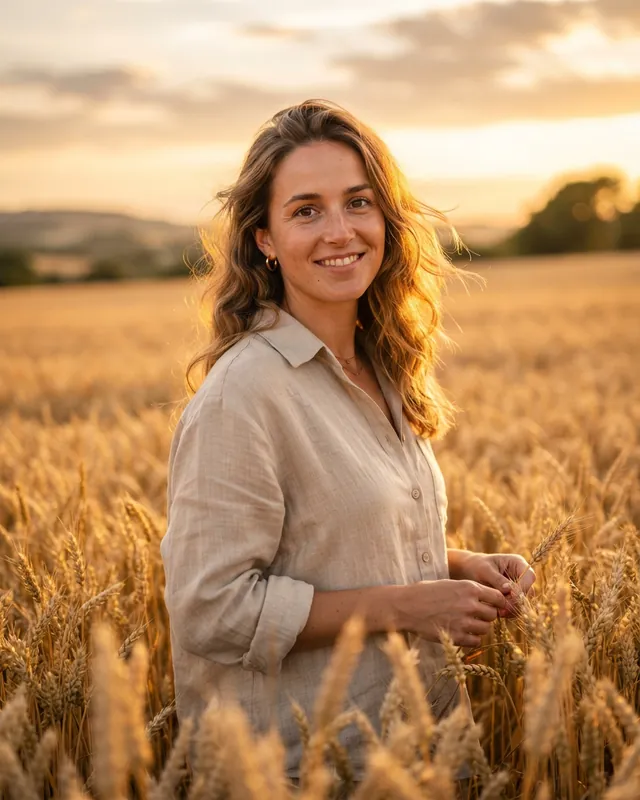
Real result · Photorealistic · 4:5 “Golden hour” asks for a low, warm sun, and “warm backlight” asks for that sun behind the subject. In this image her hair is rimmed with light, the wheat glows from behind and her face sits in soft, even light. One sun lights the whole frame, so nothing in it contradicts anything else.
Describe the light, not the equipment: in our testing, “softbox lighting” put a softbox in the frame. Phrases such as “overcast daylight”, “window light from the left” or “a single bedside lamp” describe light by what it does. More on what we found while writing the Studio style.Open this prompt in the generator: fix 1, Name the light and the time of dayGive it a lens and a camera distance
Add a lens or a camera distance, such as an 85mm portrait lens, a close-up or a macro shot, so the model knows how close the camera is and how much should be sharp.
Prompt
Macro photograph of dew drops on a green leaf, soft bokeh background, early morning
Photorealistic style adds: “photorealistic photograph, natural lighting, sharp focus, high detail”
- Style
- Photorealistic
- Ratio
- 3:4
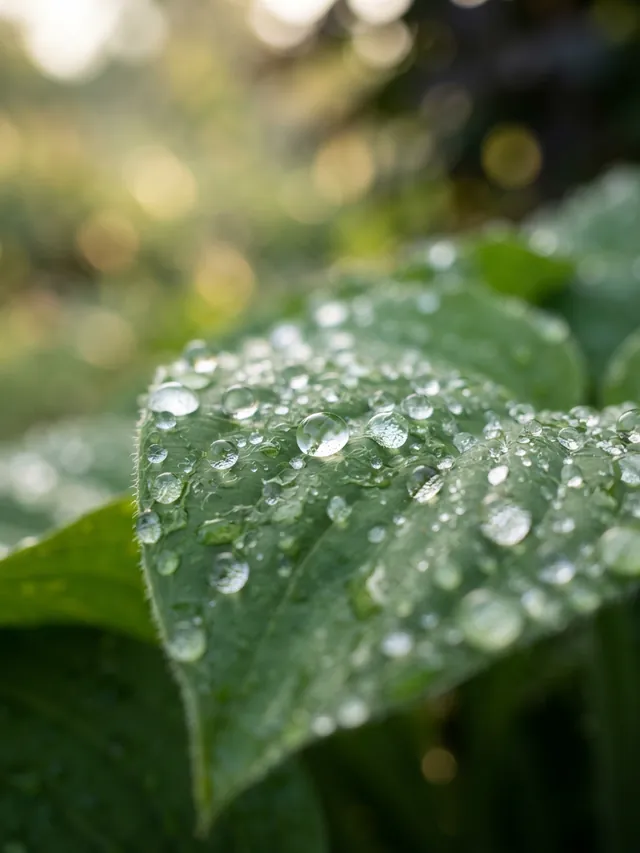
Real result · Photorealistic · 3:4 The prompt asks for a “macro photograph”, and the camera came back right up against the leaf: the nearest drops are sharp enough to show the fine hairs along its edge, and focus falls away quickly toward the back. With “soft bokeh background” in the prompt, the garden behind is round, blurred spots of light, the way a real close-up lens renders it.
The portrait in fix 1 does the same with “85mm lens, shallow depth of field”: she is sharp and the field behind her is soft. Distance words such as “close-up”, “waist-up portrait” or “wide shot from across the street” give the model the same kind of information as a lens number.Open this prompt in the generator: fix 2, Give it a lens and a camera distanceDescribe real materials and textures
Say what things are made of, because materials such as ceramic, stone, linen or brushed steel bring their own texture, and texture is what plastic-looking AI images lack.
Prompt
Minimal sculptural ceramic vase on a travertine block, soft directional shadows, warm beige studio backdrop
Studio style adds: “professional studio product photography, unbranded, soft diffused light, seamless backdrop, crisp detail”
- Style
- Studio
- Ratio
- 4:5
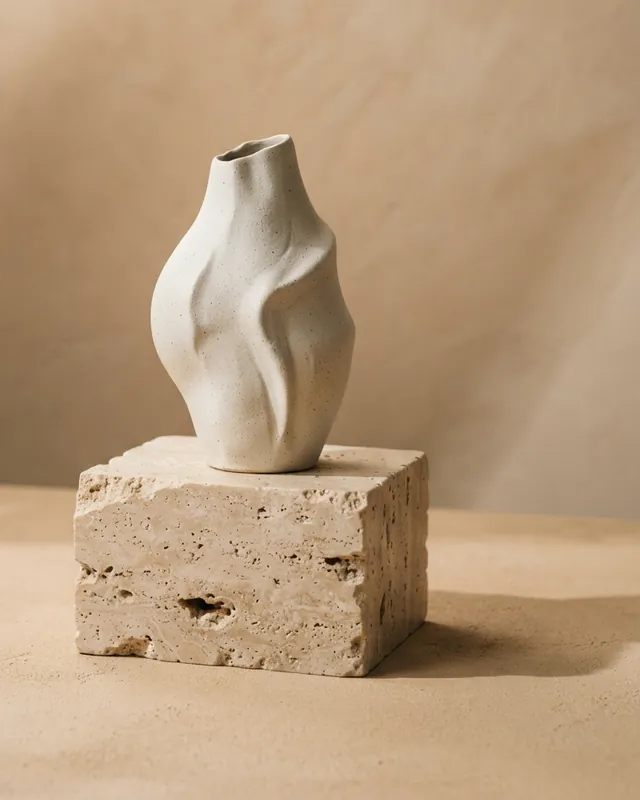
Real result · Studio · 4:5 Travertine is a specific stone, and the block came back with its typical pits, holes and layered bands. With “ceramic” in the prompt, the vase has a matte clay surface with tiny dark specks instead of a plastic sheen. The rough stone and the smooth clay take the side light differently, so the eye has real surfaces to read.
Name the material of the main subject and of the surface it sits on. “Oak table”, “linen tablecloth” or “brushed steel counter” tells the model far more than “table” on its own.Open this prompt in the generator: fix 3, Describe real materials and texturesAllow small real-world imperfections
Ask for one or two small signs of real use, such as handmade, worn, creased or uneven, because real things are rarely spotless and AI images often are.
Prompt
A small handmade ceramic cup on a wooden table, soft daylight, photorealistic photograph
No style: the prompt was sent exactly as written.
- Style
- No style
- Ratio
- 1:1
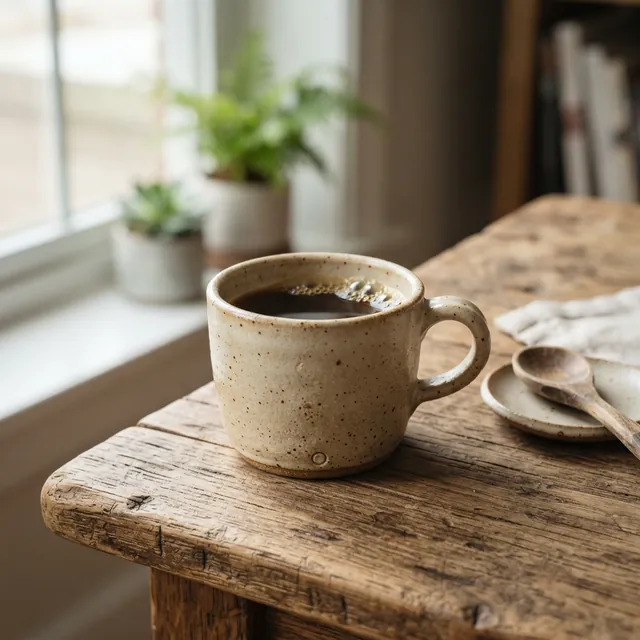
Real result · No style · 1:1 With “handmade” in the prompt, the cup came back with a speckled glaze, a small dent in its body and a round mark near the base. The tabletop under it is scuffed and split along the grain, although the prompt only said “wooden table”. Small flaws like these are what real objects look like up close.
Other imperfections to try: creased linen, a few crumbs, uneven glaze, a chipped rim, stray hairs, fingerprints on glass. Pick one or two. A prompt crowded with flaws looks staged in its own way.Open this prompt in the generator: fix 4, Allow small real-world imperfectionsKeep people, hands and crowds simple
Keep people few, and keep them far away unless they are the subject, because hands, faces and crowds are common places for AI images to go wrong.
Prompt
Rain-soaked city alley at night, neon signs reflecting on wet pavement, a lone figure with an umbrella in the distance
Cinematic style adds: “cinematic film still, dramatic lighting, shallow depth of field, rich color grading”
- Style
- Cinematic
- Ratio
- 3:4
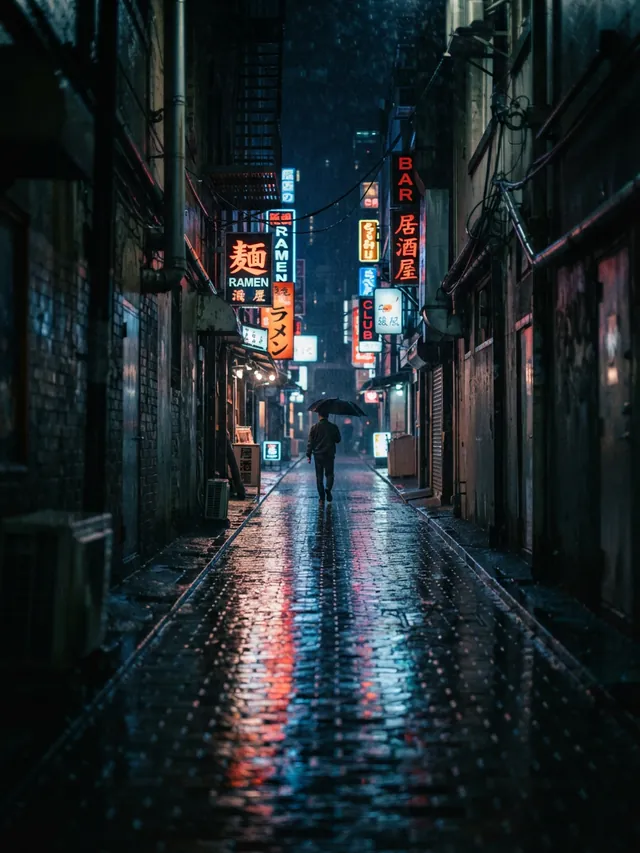
Real result · Cinematic · 3:4 The prompt asks for “a lone figure … in the distance”, and the image has one small person, seen from behind and walking away under an umbrella. No face or fingers are close enough to go wrong, and the wet cobblestones and neon reflections carry the picture instead.
When a person is the subject, ask for one person in a simple pose, with hands doing something ordinary such as holding a cup or resting in a pocket. If you need a crowd, put it far away and out of focus. Then check the hands first; see the realism check below.Open this prompt in the generator: fix 5, Keep people, hands and crowds simpleLeave text and logos out of the picture
Don't ask for words, signs or brand marks in the image, and describe products as unbranded, with blank, unlabeled packaging, because this model is unreliable at lettering.
Prompt
Glass perfume bottle with a gold cap and a blank, unlabeled front on a glossy surface, frozen water splash around the base, coral studio background
Studio style adds: “professional studio product photography, unbranded, soft diffused light, seamless backdrop, crisp detail”
- Style
- Studio
- Ratio
- 1:1
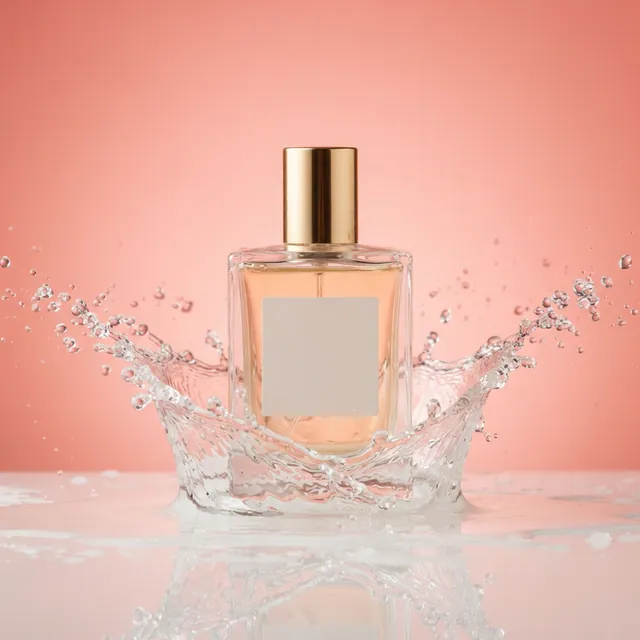
Real result · Studio · 1:1 With “blank, unlabeled front” in the prompt, the bottle's label panel came back empty, with no lettering. The Studio style adds “unbranded” too, because in our testing nano-banana-lite tended to invent trademark-like logos, but that alone was not enough: our first render of this perfume, without “blank, unlabeled” in the prompt, printed an invented brand-like name on the bottle. Moda's own description of this model says its higher tiers are the ones for “heavy in-image text”, so treat any lettering as something to check, not something to count on.
Prompts that mention signs, labels, packaging or screens invite lettering; the neon signs in fix 5 came back with lettering too. If an image needs words, add them afterwards in a design tool, where you control the spelling and the font.Open this prompt in the generator: fix 6, Leave text and logos out of the pictureUse one style, not three
Pick one style and let it do its job, rather than piling photorealistic, cinematic and illustration words into the same prompt.
Prompt
Still alpine lake at dawn, mist drifting over the water, pine-covered mountains mirrored on the surface
Photorealistic style adds: “photorealistic photograph, natural lighting, sharp focus, high detail”
- Style
- Photorealistic
- Ratio
- 3:2
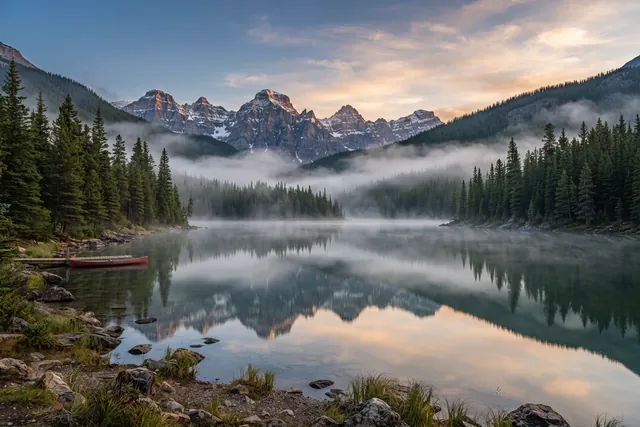
Real result · Photorealistic · 3:2 This prompt describes only the scene. The Photorealistic style, the default, adds “photorealistic photograph, natural lighting, sharp focus, high detail” to the end, and the result is sharp from the stones at the water's edge to the peaks, with natural color in the sky and the mist.
A style is a phrase added to the end of your prompt, not a separate model, and it costs nothing extra. So there is no need to type “photorealistic” again when that style is on, and adding words for a different look, such as “illustration”, gives the model two jobs at once. If you would rather write your own camera words, choose No style. That is how the handmade cup in fix 4 was made: No style, with “photorealistic photograph” typed at the end of its prompt. See the exact words each style adds.Open this prompt in the generator: fix 7, Use one style, not threeMatch the frame to the subject
Choose the aspect ratio a photographer would choose for the subject: tall for a person, wide for a landscape, square for a single object seen from above.
Prompt
Sweeping sand dunes at sunset with long shadows and a lone traveler walking along the ridge
Cinematic style adds: “cinematic film still, dramatic lighting, shallow depth of field, rich color grading”
- Style
- Cinematic
- Ratio
- 16:9
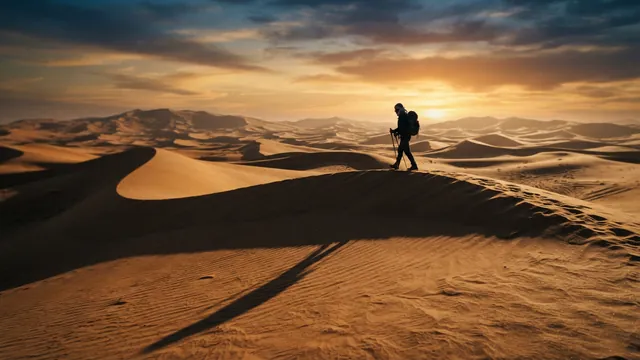
Real result · Cinematic · 16:9 The 16:9 frame gives “sweeping” room to happen: the ridge runs across the picture, the sun sits low on the horizon and the traveler's long shadow stretches over the foreground. The other examples follow the same rule: the portrait in fix 1 is 4:5, the lake in fix 7 is 3:2 and the latte in fix 9 is 1:1.
Open this prompt in the generator: fix 8, Match the frame to the subjectThe 6 aspect ratios and what each one suits Ratio Shape Typical use 1:1 Square square posts, profile images and product tiles 4:5 Portrait Instagram feed posts and portraits 3:4 Portrait taller Instagram feed posts, portraits and Pinterest 3:2 Landscape classic photos and in-article blog images 16:9 Wide banners, blog headers and slides 9:16 Story Stories, Reels and phone wallpapers Generate a few versions and keep the most natural
Run the same prompt two or three times and keep the most natural result, because every generation is new and small flaws change from one image to the next.
Prompt
Top-down photo of a latte with rosetta latte art on a walnut table, soft morning light
Photorealistic style adds: “photorealistic photograph, natural lighting, sharp focus, high detail”
- Style
- Photorealistic
- Ratio
- 1:1
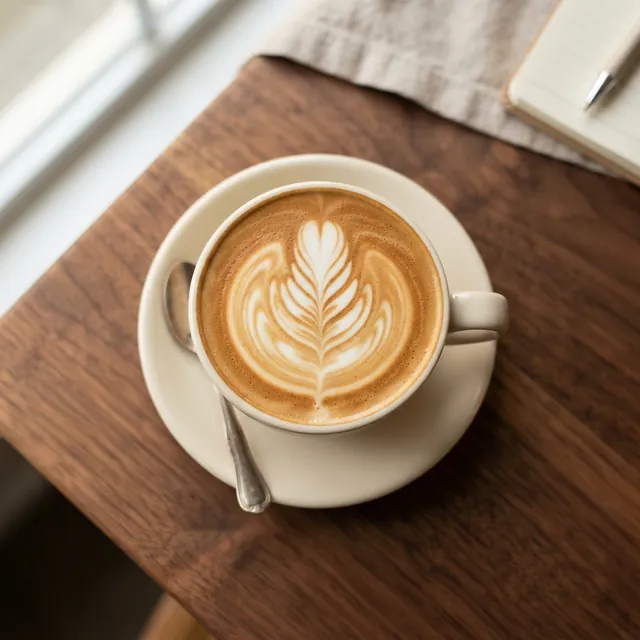
Result 1 · same prompt 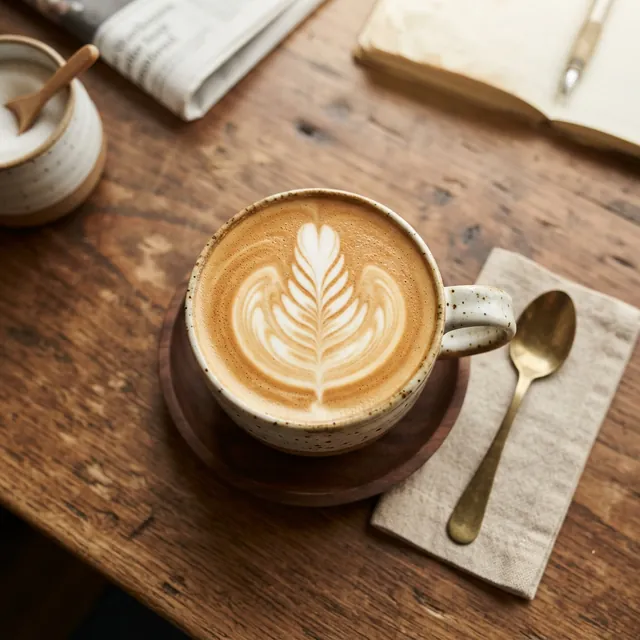
Result 2 · same prompt These are two real results from the identical prompt, style and ratio. Result 1 stays close to the prompt, with a plain cream cup on a smooth walnut table. Result 2 brings a speckled cup, a brass spoon and a rougher, older-looking table. There is no seed to lock a result, so download the one you like before you move on; image links may expire.
Your 3 free images are enough for two or three tries of one prompt; after that, each try uses a paid image. See more same-prompt pairs on the prompts page.Open this prompt in the generator: fix 9, Generate a few versions and keep the most natural
A quick realism check before you publish
Before you publish an AI photo, zoom in and check six places where errors hide: hands and fingers, hair and edges, reflections and shadows, any text or logos, repeating patterns, and earrings and other paired details. If one fails, generate again rather than hoping nobody looks closely.
Hands and fingers
Count the fingers, follow each hand back to an arm and check that a grip actually holds the object.
Hair and edges
Look where hair, fur or leaves meet the background for halos, smudges or strands that fade into nothing.
Reflections and shadows
Shadows should fall away from the light. Mirrors, windows, water and glossy surfaces should show what is in front of them.
Any text or logos
Read every letter on signs, labels and screens, and look for invented brand names or marks.
Repeating patterns
Tiles, bricks, leaves, windows and faces in a crowd should vary. Exact copies give the image away.
Earrings and symmetry
Check paired details: earrings, glasses, collars and buttons should match where they should and differ where they would.
Label AI images clearly
Label an AI image as AI-generated wherever the platform, the client or the context requires it, and never present one as a photo of a real person, a real event or a real product result. A realistic image makes a clear label more important, not less.
- Real people. Don't pass off a generated face as a real customer, employee or witness, and don't depict real, identifiable people in a misleading or harmful way. Our Terms of Service don't allow it.
- Real events. A generated scene is not evidence that something happened. Don't use one as news or documentation.
- Real products. A generated product shot shows an idea, not what a buyer will receive. Use it for concepts and mood, not as the photo of the item you sell.
- Platform rules. Many social platforms, marketplaces and publishers ask you to disclose AI images. Check the rules where you post.
We don't add a visible watermark to images from AIPhoto-Generator, so adding a label where one is needed is up to you.
What prompting can't fix
Prompting can't change the format or size of what the generator returns: each image is a single PNG of about 1 megapixel, made from text alone, with no editing, inpainting, upscaling or seed. When a detail goes wrong, the fix is another generation, not a repair.
- About 1 megapixel
- Every image is one PNG of about 1 megapixel: 1024 × 1024 px at 1:1 and 928 × 1152 px at 4:5. That suits screens and social posts but is too small for large prints.
- No editing
- AIPhoto-Generator is text to image only. You can't upload a photo, retouch part of an image, inpaint, upscale or add reference images.
- No seed
- You can't lock a result and adjust it. The same prompt gives a different image every time.
- Some errors need another try
- A sixth finger or a misspelled label won't always go away with more words. Generate again and compare.
- 3 free images
- Your first 3 images are free, with no account and no email, and they don't reset. After that, generating uses paid images from an image pack or the Pro plan; see pricing. Each image usually takes about 5 seconds.
How we made the examples on this page
Every image on this page is a real generation from AIPhoto-Generator, our realistic AI photo generator, made from exactly the prompt, style and aspect ratio shown beside it.
The model is nano-banana-lite, used through the Moda API. Moda lists it as “NanoBanana 2 Lite”, with “gemini” as its provider. Where a style was on, its words were added to the end of the prompt, and we show them under each prompt. The example images were resized for the web to 640 and 1280 pixels wide, cropped to the exact aspect ratio where needed and converted to WebP, without retouching; for every aspect ratio except 16:9 the 1280-pixel copy is larger than the image the generator returns. The two latte images in fix 9 came from running one prompt twice.
AIPhoto-Generator is independent: a customer of Moda, not owned by or affiliated with Moda or Google. Read more about how our examples are made.