AI carousel post maker: Matching images for every slide
Write one prompt per slide and repeat the same backdrop, light and color words in each. That's how the real 3-slide set below was made, and it came back looking like one series, with small differences in tone.
It makes the image for each slide, one at a time. It isn't a carousel editor: add the text, put the slides in order and post them in your app.
- 3 free images
- No sign-up
- PNG download
Last updated
 1/3
1/3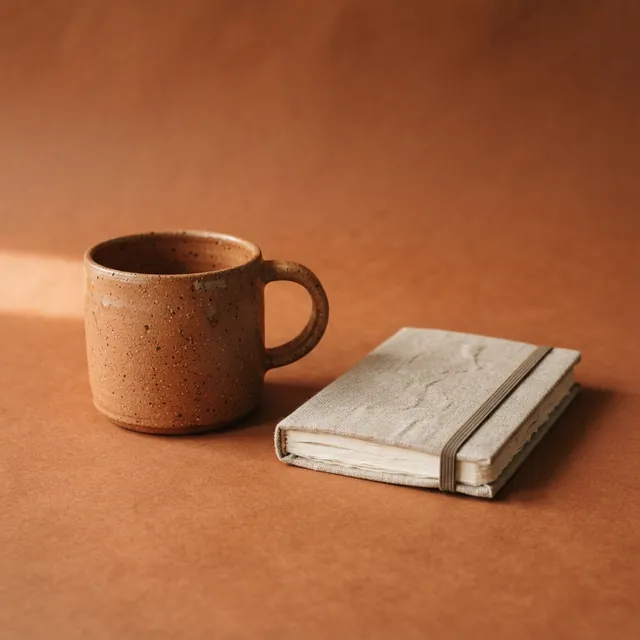 2/3
2/3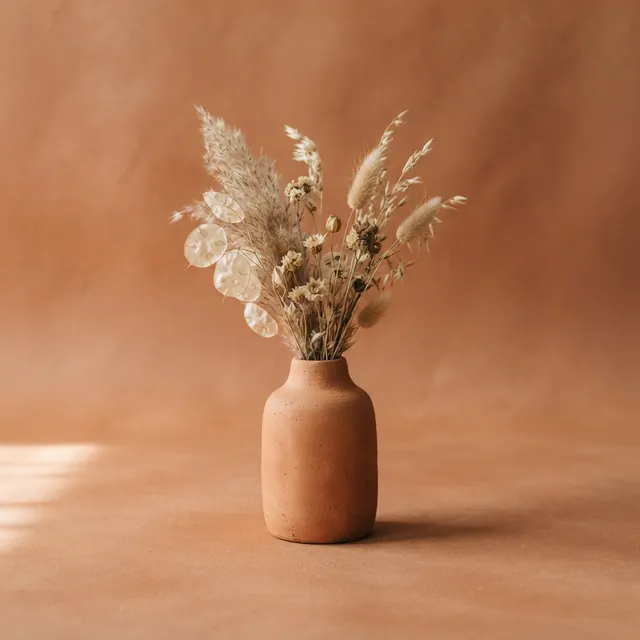 3/3
3/3
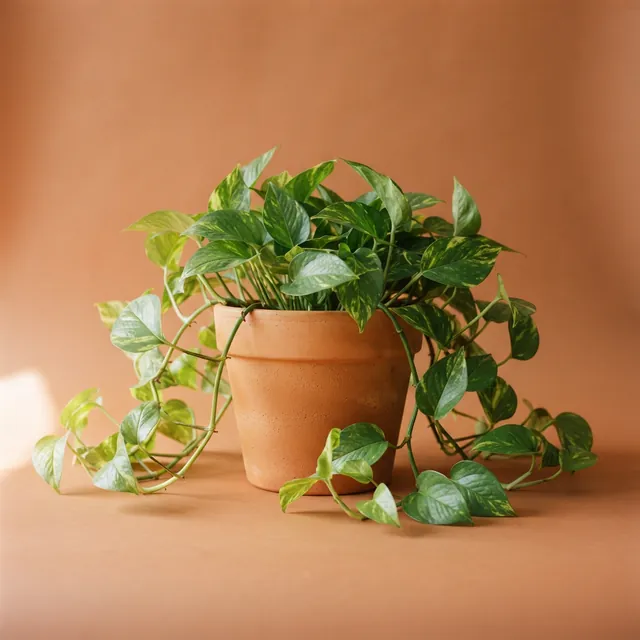
Real results from AIPhoto-Generator, with slide numbers added by this page. The main image's prompt: “A terracotta pot with a trailing pothos plant on a terracotta-colored backdrop, soft warm side light, minimal composition”
Shapes
Slide shapes
Use the same shape for every slide: a carousel shows all its slides at one size.
1:1
Square slides
The usual carousel shape: every slide shows at the same size.
Output: 1024 × 1024 px
Try it at 1:14:5
Portrait slides
More height per slide in the feed. Instagram shows 4:5 uncropped.
Output: 928 × 1152 px · source: Instagram Help Center: image resolution of photos you share
Try it at 4:5
Prompt ideas
Carousel prompt sets
Each set repeats one phrase in every slide's prompt. Run the slides one by one with the same style and shape so they look like a set; expect small differences, and re-run any slide that drifts.
Product range, 3 slides
- Style
- Studio
- Ratio
- 1:1
Shared phrase in every slide: “on a sage-green backdrop, soft warm side light, minimal composition”
- Open slide 1 in the generator
1A glass bottle of olive oil with a blank label, on a sage-green backdrop, soft warm side light, minimal composition
- Open slide 2 in the generator
2A small wooden bowl of green olives, on a sage-green backdrop, soft warm side light, minimal composition
- Open slide 3 in the generator
3A rustic loaf of bread with a little dish of oil, on a sage-green backdrop, soft warm side light, minimal composition
Recipe steps, 4 slides
- Style
- Photorealistic
- Ratio
- 4:5
Shared phrase in every slide: “on a pale marble countertop, overhead view, soft daylight”
- Open slide 1 in the generator
1Flour, eggs, butter and sugar laid out in small bowls, on a pale marble countertop, overhead view, soft daylight
- Open slide 2 in the generator
2A mixing bowl of cookie dough with a wooden spoon, on a pale marble countertop, overhead view, soft daylight
- Open slide 3 in the generator
3Cookie dough rolled out with star-shaped cutters, on a pale marble countertop, overhead view, soft daylight
- Open slide 4 in the generator
4Golden star cookies cooling on a wire rack, on a pale marble countertop, overhead view, soft daylight
Travel diary, 3 slides
- Style
- Editorial
- Ratio
- 4:5
Shared phrase in every slide: “in soft golden-hour light, muted warm tones, no people”
- Open slide 1 in the generator
1A narrow cobblestone street with flower pots on the steps, in soft golden-hour light, muted warm tones, no people
- Open slide 2 in the generator
2A small seaside café table with an espresso cup, in soft golden-hour light, muted warm tones, no people
- Open slide 3 in the generator
3A harbor with small wooden fishing boats, in soft golden-hour light, muted warm tones, no people
Tips carousel backgrounds, 4 slides
- Style
- No style
- Ratio
- 4:5
Shared phrase in every slide: “on a plain terracotta paper backdrop, soft even light, large empty area for text”
- Open slide 1 in the generator
1A single yellow pencil along the bottom edge, on a plain terracotta paper backdrop, soft even light, large empty area for text
- Open slide 2 in the generator
2A silver paperclip in the lower corner, on a plain terracotta paper backdrop, soft even light, large empty area for text
- Open slide 3 in the generator
3A blank sticky note at the bottom, on a plain terracotta paper backdrop, soft even light, large empty area for text
- Open slide 4 in the generator
4A ceramic coffee cup at the bottom right, on a plain terracotta paper backdrop, soft even light, large empty area for text
Examples
A real 3-slide set
Three real images from AIPhoto-Generator, made from three prompts that end with the same phrase. Same style, same shape, one look.
Slide 1: the plant.
Prompt: A terracotta pot with a trailing pothos plant on a terracotta-colored backdrop, soft warm side light, minimal composition
Real result · Studio · made at 1:1 · about this image: Carousel 1: trailing plant
Slide 2: the mug and notebook.
Prompt: A speckled terracotta ceramic mug and a small linen-bound notebook on a terracotta-colored backdrop, soft warm side light, minimal composition
Real result · Studio · made at 1:1 · about this image: Carousel 2: mug and notebook
Slide 3: the bud vase.
Prompt: A terracotta bud vase with dried flowers on a terracotta-colored backdrop, soft warm side light, minimal composition
Real result · Studio · made at 1:1 · about this image: Carousel 3: bud vase
How it works
How to make a carousel post with AI images
Your first 3 images are free, and you don't need an account for them.
- 01
Plan the slides
A hook for slide 1, the content slides, and a closing slide.
- 02
Write one prompt per slide
Change the subject; keep one shared phrase for backdrop, light and colors. Use the same style and shape for all.
- 03
Generate, then assemble
Generate each slide, download the PNGs, add your text and post them in order.
Tips
Tips for carousel slides
Repeat a shared phrase
Repeating the same backdrop, light and color words in every prompt usually gives a matching set; results vary.
One style, one shape
Mixing styles or shapes breaks the set. Pick both once and keep them.
Make slide 1 the hook
Use your strongest image first, with room for a title.
Leave space on text slides
Ask for a large empty area where your tip or step will go.
Re-run the odd one out
If one slide doesn't match, run its prompt again. On a paid plan you can make up to 4 versions at once and keep the closest; each uses one paid image.
Good to know
What it doesn't do
Text and templates
It doesn't add text, fonts or slide layouts.
Assembling and posting
It doesn't order, export or post the carousel. Do that in your app.
The exact same object
Each slide is a new image, so a repeated object won't look identical from slide to slide.
Your own product
There's no photo upload, so it can't show your real product.
Does it make the whole carousel, with text?
No. It makes the image for each slide. Add your text and arrange the slides in Instagram, LinkedIn or a design app.
How do I keep carousel slides consistent?
Repeat one phrase about the backdrop, light and colors in every slide's prompt, and use the same style and shape for all of them. The AI images for social media guide shows a real 3-slide set made this way.
How many slides can I make for free?
Your first 3 images are free, which is enough for one 3-slide carousel if every slide works the first time; any retries use paid images. At busy times, free capacity for the whole site can run out. After that, generating uses paid images from an image pack or the Pro plan. Paid plans allow up to 4 images per prompt, and each image uses one paid image. See pricing.
Can the same product appear on every slide?
Not reliably. Each slide is a new image, so a repeated object will change a little from slide to slide. Use different objects that share a look, or use real photos for your actual product.
What size should carousel slides be?
Square (1:1, 1024 × 1024 px) or portrait (4:5, 928 × 1152 px), the same for every slide.
Can I use the slides for a LinkedIn carousel?
Yes. Generate the slides, add your text in a design app, then upload them to LinkedIn in the format it asks for.
More ways to use the generator
- AI Instagram post generatorFeed post, square and Story images from a prompt, with ready-to-run Instagram prompts.
- AI social media post generatorImages for feeds, headers, thumbnails and Stories, with a shape for every kind of post.
- AI PFP generatorAvatars, characters and aesthetic profile pictures made from a description, not from your photo.
- AI gift card generatorArtwork for printed and emailed gift cards, ready for your text, name and amount.
Guides for this
- AI images for social mediaWhich aspect ratio to pick for posts, Stories and carousels, with real examples and notes on size and text.
- AI photo styles comparedThe exact words each of the six styles adds to your prompt, with a real example of each.
- AI photo promptsEvery prompt shown next to the real image it produced, with its style and aspect ratio.
Start creating
Your next image is one sentence away.
Describe it, generate it, download it. Your first 3 images are free, no account needed.