Blog
Why does the same prompt give a different AI image every time?
AI image generators sample every picture with built-in randomness, so the same prompt usually gives a different image each time. The prompt steers what the picture shows; the random part decides what the prompt leaves open, such as framing, props and small details. Tools with a seed setting can repeat a result; AIPhoto-Generator has none, so every generation is new.
Last updated
Randomness is part of how images are generated
Image models don't look a picture up; they generate it by sampling, a process with randomness built in. Each run draws a fresh random starting point, so the same prompt lands on a different picture.
In diffusion models, a widely used kind, the random part is literal: generation starts from pure random noise and removes it step by step, steered by the prompt. Other model designs sample their output in other ways, but they also pick among many likely options rather than one fixed answer.
The prompt decides what the picture is about. The random starting point decides everything the prompt leaves open: the exact framing, the props, the textures, which way a face turns. The more a prompt leaves open, the more two results differ.
What changed between two runs of one prompt
In the three same-prompt pairs we published, the second run kept the main things the prompt named and changed nearly everything it didn't. Each pair was made from the exact prompt shown, with the same style and ratio both times.
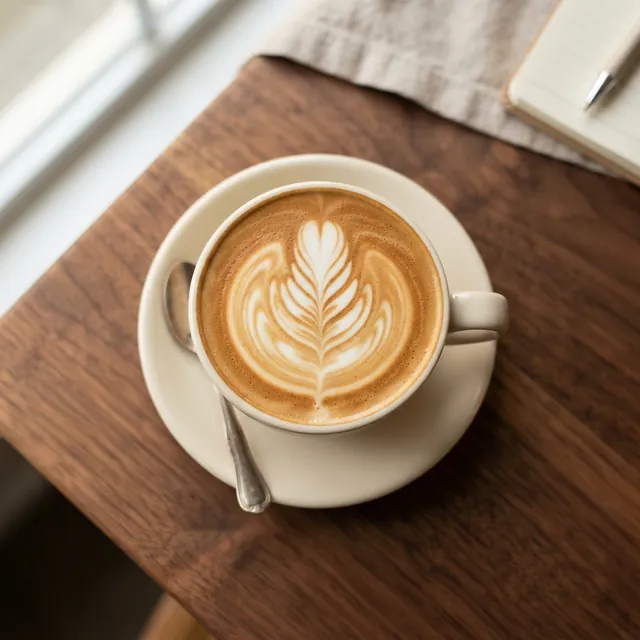
First result
Real result · Photorealistic · 1:1 · more about this image: Latte art from above
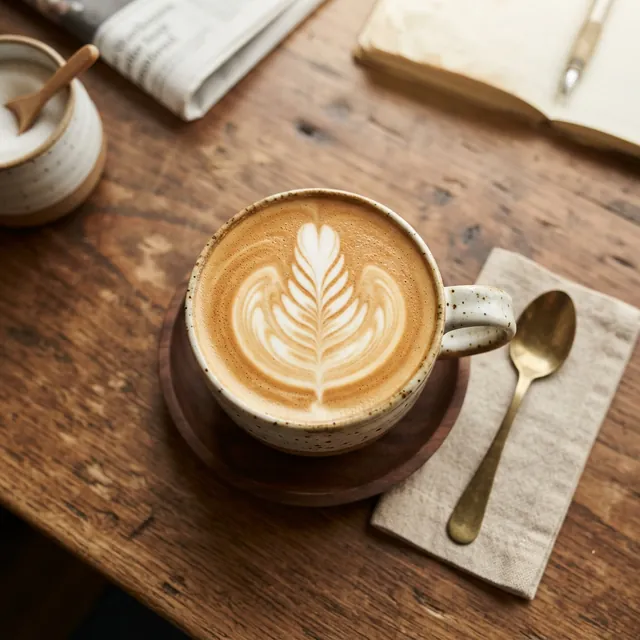
Second result, same prompt
Real result · Photorealistic · 1:1 · more about this image: Latte art from above
Prompt: Top-down photo of a latte with rosetta latte art on a walnut table, soft morning light
Stayed the same: The top-down view, the rosetta in the foam, a wooden table and soft daylight.
Changed: The cup went from plain white to speckled stoneware, the saucer from white to dark wood, the silver spoon became brass on a linen napkin, and the props changed from a notebook and pen to a sugar pot, a newspaper and an open book with a pen.
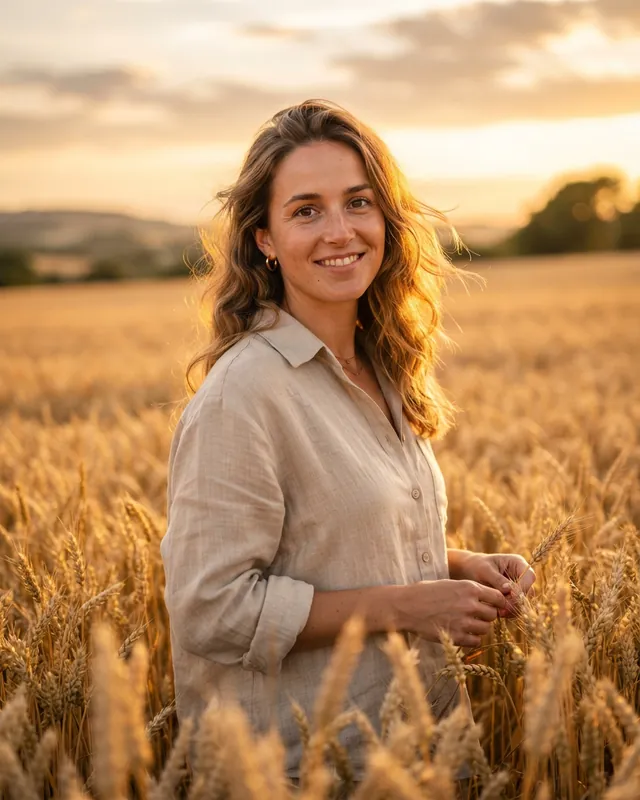
First result
Real result · Photorealistic · 4:5 · more about this image: Golden hour portrait
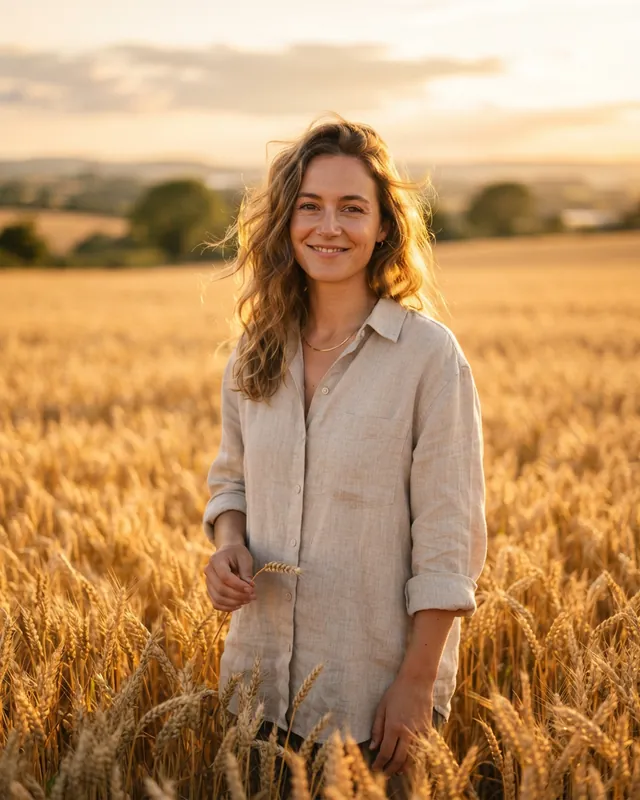
Second result, same prompt
Real result · Photorealistic · 4:5 · more about this image: Golden hour portrait
Prompt: Portrait of a woman in a linen shirt standing in a wheat field at golden hour, warm backlight, 85mm lens, shallow depth of field
Stayed the same: Golden-hour backlight, a wheat field, a linen shirt and a shallow depth of field.
Changed: A different-looking woman, standing further back and more centrally, holding a single wheat stem instead of several, with rolling fields and scattered trees along the horizon instead of a hill on one side and a clump of trees on the other.
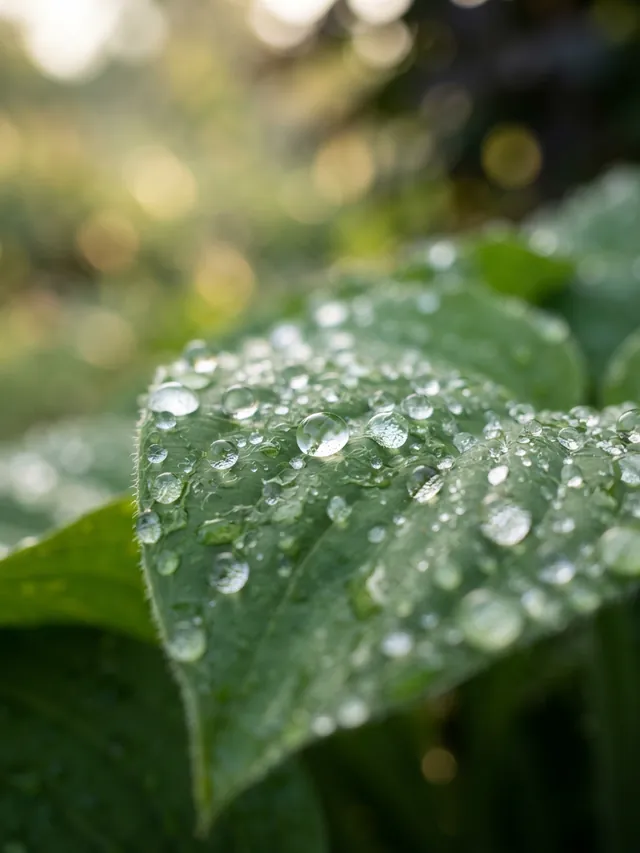
First result
Real result · Photorealistic · 3:4 · more about this image: Dew on a leaf
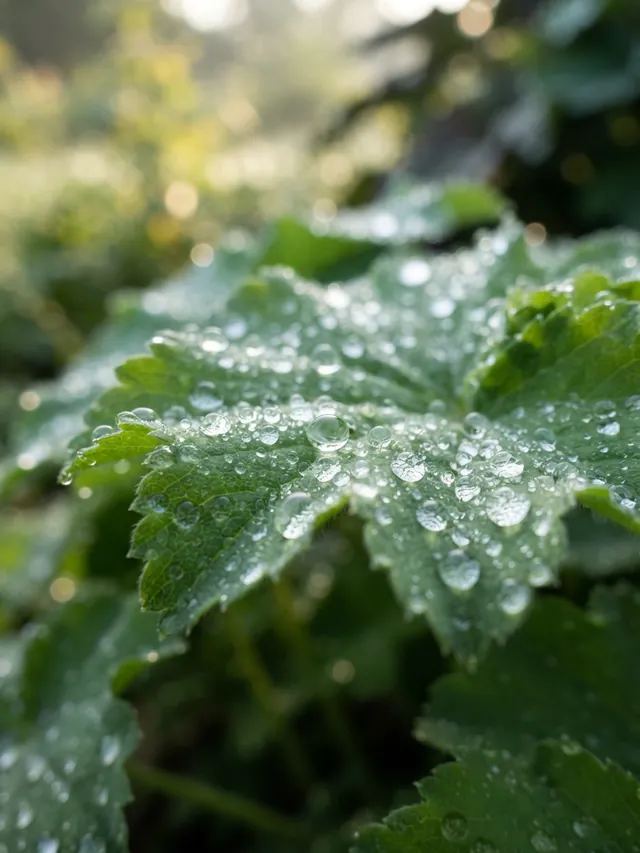
Second result, same prompt
Real result · Photorealistic · 3:4 · more about this image: Dew on a leaf
Prompt: Macro photograph of dew drops on a green leaf, soft bokeh background, early morning
Stayed the same: A close-up of dew drops on a green leaf with soft, glowing bokeh in early light.
Changed: A smooth-edged leaf crossing the frame diagonally became a cluster of scalloped, serrated leaves, and the background turned lighter and greener.
The example images were resized for the web to 640 and 1280 pixels wide, cropped to the exact aspect ratio where needed and converted to WebP, without retouching; for every aspect ratio except 16:9 the 1280-pixel copy is larger than the image the generator returns. The same-prompt section of the AI photo prompts page lists these three pairs next to every other prompt and its result.
What a seed is, and why it matters
A seed is the number that fixes the random starting point. Reuse the same seed with the same prompt, settings and model, and many tools give you the same image or one very close to it.
Tools that show a seed let you lock a composition you like and then change one word to see what that word does. Some services still vary slightly between runs, and a seed stops working once the model or settings change.
AIPhoto-Generator has no seed setting, so every generation is new. That keeps the tool simple, but it means you can't recreate a result exactly: download the ones you want to keep.
How to get more consistent results without a seed
Without a seed, the way to get closer results is to leave less open: describe the things you care about precisely, and keep the style and shape fixed.
- Name the details that matter. In the latte pair, the prompt didn't name the cup, so the cup changed. “A plain white porcelain cup on a matching saucer” would have pinned it down.
- Say where things are. “Seen from the waist up, centered” constrains framing far more than “portrait”.
- Keep the style and ratio the same. Both change the picture on their own; see AI photo styles and aspect ratios.
- Reuse your wording exactly. Copy the prompt rather than retyping it, so small wording changes don't add variation of their own.
- Make several and pick. Paid plans can make up to 4 images from one prompt at once, which is the quickest way to find the version closest to what you had in mind.
How to tell whether a prompt change helped
One before-and-after pair can't tell you whether a prompt change worked, because the random part changed too. Compare a few results from each version instead.
If you add “soft window light” and the next image looks brighter, the new words may have done it, or the new random draw may have. Look for the change across several images from each version: if it shows up in most of them, it came from the prompt. The last fix in the realism guide, generating a few versions, follows the same idea.
When getting a different image is useful
Variation is a feature when you're still deciding what you want: each run is a new take on the same brief.
For mood boards, social posts and header images, running a prompt twice is a cheap way to see options you wouldn't have described, like the brass spoon and napkin in the second latte. When one result is right, keep it, and write the details it got right into your prompt for next time.
Questions
Can I get exactly the same image twice from one prompt?
Only with a tool that lets you reuse a seed, and the same prompt, settings and model. AIPhoto-Generator has no seed setting, so download any image you want to keep.
Is it a bug when the same prompt gives a different image?
No. Randomness is part of how image models generate pictures, and it's what makes each run a new take on the same prompt.
What stays the same between runs?
Mostly what the prompt names. In our three pairs the subject, setting, light and camera angle held, while unnamed details such as the cup, the props and the framing changed.
How do I reduce the variation?
Describe the details you care about, say where things sit in the frame, keep the style and aspect ratio the same, and reuse your exact wording. The AI photo prompts guide shows prompts that name these details.
Does changing the style or aspect ratio change the picture too?
Yes. A style adds its own words to the prompt, and a different shape changes the composition, so either one gives a new picture on top of the usual variation.