Blog
Text-to-image vs image-to-image AI: what's the difference?
Text-to-image AI creates a new picture from a written description alone. Image-to-image AI starts from a picture you upload and changes it, guided by your words. Use text-to-image when you need something that doesn't exist yet, and image-to-image when the result must keep a specific product, face or layout. AIPhoto-Generator is text-to-image only.
Last updated
The difference at a glance
The input decides everything else: a text-to-image tool only ever sees your words, while an image-to-image tool sees a picture and changes it. That's why the two are good at different jobs.
Swipe the table sideways to see all columns.
| Aspect | Text-to-image | Image-to-image |
|---|---|---|
| You start with | A written description (the prompt) | An image you upload, plus usually a short instruction |
| The result | A new picture that didn't exist before | A changed version of your picture |
| What carries over | Only what the words describe | Whatever the tool is told to keep: a face, a product, a layout, a composition |
| Typical jobs | Concepts, scenes, stock-style photos, social posts, mood boards | Edits, restyles, extending a photo, swapping a background, enlarging |
| Typical surprise | Details you didn't mention are invented | Changes leak into parts you wanted untouched |
How text-to-image works
You describe a picture in words and the model draws a new one to match. It works out the subject, setting, light and framing from the prompt, and fills in everything you didn't mention on its own.
The prompt for this lake names a place, a time of day, an atmosphere and a reflection. Nothing in it says how many pine trees to draw, which peaks to show or that a red canoe should sit by the shore: the model decided those.
That's the trade-off of text-to-image. It's fast for anything you can describe, and the more you describe, the more control you get, but you can't point at a picture and say “like this one”. The AI photo prompts guide shows how much the wording steers the result.
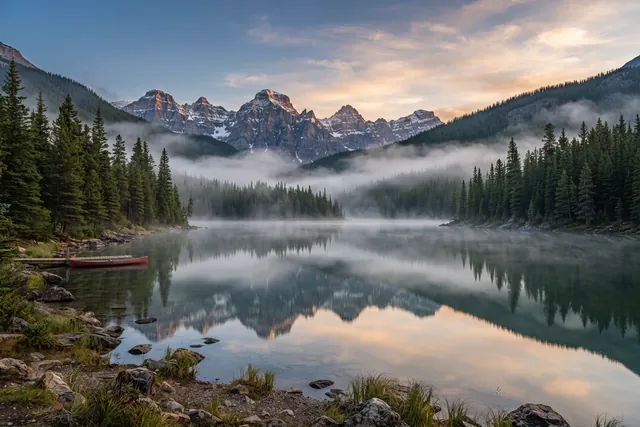
Made from text alone: every tree, peak and patch of mist came from the model.
Prompt: Still alpine lake at dawn, mist drifting over the water, pine-covered mountains mirrored on the surface
Real result · Photorealistic · 3:2 · more about this image: Alpine lake at dawn
What image-to-image covers
Image-to-image is a family of jobs that all start from an existing picture. Which of them a tool offers varies a lot, so check its feature list rather than assuming.
- Variations. New pictures that stay close to one you upload.
- Style transfer or restyling. The same scene redrawn in another look, such as a photo turned into an illustration.
- Inpainting. Repainting one marked area, for example replacing a cup on a table, while the rest stays put.
- Outpainting. Extending a picture beyond its edges, for example turning a portrait crop into a wide banner.
- Background removal or replacement. Cutting out the subject and putting it somewhere else.
- Upscaling. Enlarging an image by predicting the missing detail, so it can be shown or printed bigger.
- Reference images. An uploaded picture that guides the pose, composition or style of a new one, without being edited itself.
When text-to-image is the right choice
Text-to-image fits whenever the picture doesn't exist yet and doesn't have to show one particular real thing: a mood, a scene, an idea, a background.
- Blog headers, slides and placeholder imagery; see AI stock photos.
- Social posts and story backgrounds; see AI images for social media.
- Mood boards and visual briefs, where several different takes on one idea are useful.
- Concept images of places, products or scenes that you can describe but don't have a photo of.
When you need image-to-image instead
You need image-to-image when the result has to keep something specific from a real picture: your product, your room, a particular face or an existing layout. Words alone can't carry that across.
Describing your own product in a prompt gives you a product that looks like the description, not the item you sell. The same goes for retouching an existing photo, fixing one detail, or enlarging an image for print. All of those need a tool that accepts an upload.
AIPhoto-Generator is text-to-image only: it takes a prompt and returns new PNG images of about 1 megapixel each, with no upload, editing or upscaling. If your job is on the list above, use an editor that accepts images; our comparisons list which tools say they do.
Can text-to-image keep the same subject?
Only roughly. Without a reference image, each generation invents the details again, so a character or product drifts from one image to the next even with the same prompt.
Describing the subject the same way every time (age, hair, clothes, colors, materials) narrows the drift but doesn't remove it. Why that happens, and what you can do about it, is covered in why the same prompt gives a different image.
Photos of real people
Uploading a photo of a real person to an image-to-image tool raises questions text-to-image doesn't: whose photo it is, whether they agreed, and what the result will be used for.
Get the person's permission first, read the tool's rules on images of people, and never present an edited or generated image as a real photo of someone. With text-to-image you don't upload anyone's photo, but a prompt can still name or describe a real person, so the same care applies: our Acceptable Use Policy explains what isn't allowed.
Questions
Is AIPhoto-Generator text-to-image or image-to-image?
Text-to-image only. You type a prompt and get new PNG images; you can't upload a photo, edit an image or upscale one.
Can text-to-image turn my own photo into an AI image?
No. A text-to-image tool never sees your photo, so describing it in words gives you a new picture that resembles the description, not your photo. For that you need a tool that accepts uploads.
Is image-to-image higher quality than text-to-image?
Neither is higher quality by definition. They solve different problems: one invents a picture, the other changes one. The model, the settings and the input decide the quality.
What is inpainting?
Inpainting repaints a marked area of an existing image, for example to replace an object, while leaving the rest of the picture unchanged. It's an image-to-image feature.
What's the difference between upscaling and generating a bigger image?
Upscaling enlarges an image that already exists by predicting extra detail. Generating at a bigger size makes the picture at that size in the first place. AIPhoto-Generator does neither: every image is about 1 megapixel; the aspect ratio guide lists the exact sizes.