Comparison
AIPhoto-Generator vs Canva
Canva's AI image generator lives inside a full design platform: images go straight into the editor for text and layouts, with reference uploads, Magic Edit and four options per prompt, and it needs a Canva account. AIPhoto-Generator only makes images: 3 free with no account, then image packs or a monthly plan.
Last updated
The main differences
- Designing: Canva puts generated images straight into its editor to add text, layers and effects; AIPhoto-Generator gives you a PNG to use in any design tool, Canva included.
- Account and free use: Canva needs an account, and Canva Free includes up to 20 AI uses a month; AIPhoto-Generator gives 3 images in total with no account.
- Editing: Canva has reference uploads, Magic Edit, Magic Expand and upscaling; AIPhoto-Generator takes text only.
- Paying: Canva Pro is a subscription to the whole design platform; AIPhoto-Generator sells images only, as packs or a monthly plan.
- Images per prompt: Canva's Dream Lab gives four options per prompt; AIPhoto-Generator gives one on the free plan and up to 4 on paid plans.
Side by side, fact by fact
Each Canva fact links to its source.
Swipe the table sideways to see all columns.
| Fact | AIPhoto-Generator | Canva |
|---|---|---|
| Free use | 3 free images in total, with no sign-up; they don't resetSource: pricing | Up to 20 AI uses a month on Canva Free, shared across AI toolsSource: canva.com |
| Account to generate | Not for the 3 free imagesSource: pricing | Yes: log in or sign up when promptedSource: canva.com |
| Paid plans | Starter $5 for 100 images, Creator $15 for 400, Pro $9/month for 300Source: pricing | Pro $18 a month or $144 a year; Business $25 a month per personSource: canva.com |
| How you pay | One-time image packs whose images don't expire, or a monthly plan where unused images roll overSource: pricing | Subscription with a monthly AI allowance rather than numbered creditsSource: canva.com |
| What you can give it | A text prompt only: no photo upload, editing or upscalingSource: About | Text, reference image uploads, Magic Edit and Magic ExpandSource: canva.com |
| Models | One model: Moda lists it as “NanoBanana 2 Lite”, with “gemini” as its providerSource: About | Not named per tier; Canva says Leonardo.ai technology powers Dream LabSource: canva.com |
| Output size | A PNG of about 1 megapixel; one per prompt on the free plan, up to 4 on paid plansSource: aspect ratio guide | Native size not published; its upscaler goes up to 50 megapixelsSource: canva.com |
| Aspect ratios | 1:1, 4:5, 3:4, 3:2, 16:9 and 9:16Source: aspect ratio guide | You pick an aspect ratio; no full list is publishedSource: canva.com |
| Are images public? | No public gallery: each image is delivered to you by link, and links may expireSource: Privacy Policy | Designs stay private unless you choose to share themSource: canva.com |
| Using the images | We don't claim ownership of your images; use is subject to our Terms and the model provider's termsSource: Terms | You own your output and may use it for any lawful purpose, per its AI termsSource: canva.com |
| Watermark | We don't add a visible watermarkSource: realism guide | Its help says Dream Lab images include a visible AI labelSource: canva.com |
| Where it runs | Any web browser, desktop or mobileSource: generator | Web, Windows, macOS, iOS, Android and ChromebookSource: canva.com |
Facts about Canva come from its own public pages, last checked .
What Canva offers that we don't
These come from Canva's own pages; we haven't tested them hands-on.
- Dream Lab gives four image options for each prompt. (source)
- Generated images open straight in the Canva editor for text, layers and effects. (source)
- More than ten style presets, from Photo and Cinematic to Vector and Minimalist. (source)
- On paid plans other than Pro Lite, Standard-tier AI tools don't use the monthly allowance. (source)
What AIPhoto-Generator does differently
If you design in Canva anyway, you can make the photo here and drop the PNG into your design. This 4:5 feed image came from the prompt below with the Studio style.
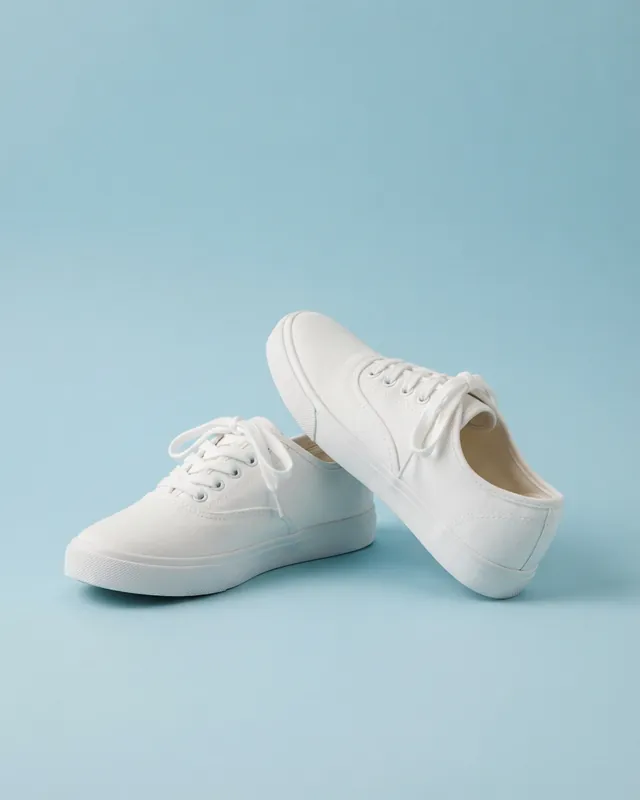
Prompt: A pair of plain white canvas sneakers on a pastel blue backdrop, one shoe tilted on its side, soft shadow, minimal composition
Real result · Studio · 4:5 · more about this image: White canvas sneakers
Which one to choose
Choose Canva if…
- You already design social posts, slides or print in Canva.
- You want to add text and layouts right after generating.
- You need Magic Edit, Magic Expand or reference images.
- Your team shares one design workspace.
Choose AIPhoto-Generator if…
- You only need the image, not a design tool.
- You don't want to create an account.
- You'd rather pay for images than for a whole design subscription.
- You want to know the exact number of free images up front.
Canva is a trademark of its owner. AIPhoto-Generator isn't affiliated with it. How we compare
Questions
Is Canva's AI image generator free?
Canva Free includes up to 20 uses of its Standard or Premium AI tools a month, shared across its AI features, and the allowance resets on the first of each month.
Do I need a Canva account to generate images?
Yes: Canva asks you to log in or sign up when you generate. AIPhoto-Generator's 3 free images need no account.
Who owns images made with Canva's AI?
Canva's AI product terms say you own your output and may use it for any lawful purpose, except output that modifies content from Canva's library. Our Terms of Service say we don't claim ownership of your images.
Is Canva connected to Leonardo AI?
Yes. Canva's help center says Leonardo.ai technology powers its Dream Lab image generator. See AIPhoto-Generator vs Leonardo AI for that comparison.