Comparison
AIPhoto-Generator vs Raphael AI
Raphael AI and AIPhoto-Generator both let you generate without an account. Raphael's free model runs at 0.5K in a short queue with a watermark, and its terms limit free images to non-commercial use; signing in adds daily credits for its other models, editor and upscaler, and paid plans remove the watermark and allow commercial use. AIPhoto-Generator gives 3 free images at about 1 megapixel with no visible watermark, then packs or a monthly plan.
Last updated
The main differences
- Free images: Raphael's free model works at 0.5K in a short queue and adds a watermark; AIPhoto-Generator's free images are about 1 megapixel with no visible watermark.
- Using free images: Raphael's terms limit free users to personal, non-commercial use; our Terms set the same image rules for free and paid images.
- Choice: Raphael offers many models, reference images, an editor and an upscaler to 4096 px; AIPhoto-Generator has one model and takes text only.
- Paying: Raphael sells monthly credit subscriptions and credit packs valid for six months; AIPhoto-Generator's image packs don't expire.
Side by side, fact by fact
Each Raphael AI fact links to its source.
Swipe the table sideways to see all columns.
| Fact | AIPhoto-Generator | Raphael AI |
|---|---|---|
| Free use | 3 free images in total, with no sign-up; they don't resetSource: pricing | A zero-credit model at 0.5K with no sign-up, in a short queue; free daily credits when you sign inSource: raphael.app |
| Account to generate | Not for the 3 free imagesSource: pricing | Not for the free model; other models need sign-inSource: raphael.app |
| Paid plans | Starter $5 for 100 images, Creator $15 for 400, Pro $9/month for 300Source: pricing | Pro $20, Ultimate $40 or Max $80 a month, or about half billed yearlySource: raphael.app |
| How you pay | One-time image packs whose images don't expire, or a monthly plan where unused images roll overSource: pricing | Monthly credit subscriptions, plus one-time credit packs valid for 6 monthsSource: raphael.app |
| What you can give it | A text prompt only: no photo upload, editing or upscalingSource: About | Text, up to 6 reference images, an instruction-based editor and an upscalerSource: raphael.app |
| Models | One model: Moda lists it as “NanoBanana 2 Lite”, with “gemini” as its providerSource: About | Nano Banana, GPT Image and Seedream models, picked automatically or by handSource: raphael.app |
| Output size | A PNG of about 1 megapixel; one per prompt on the free plan, up to 4 on paid plansSource: aspect ratio guide | 0.5K on the free model; up to 4K on credit modelsSource: raphael.app |
| Aspect ratios | 1:1, 4:5, 3:4, 3:2, 16:9 and 9:16Source: aspect ratio guide | 13 ratios on the default model, from 9:21 to 21:9Source: raphael.app |
| Are images public? | No public gallery: each image is delivered to you by link, and links may expireSource: Privacy Policy | Subscribers' images stay out of its public gallery; free images aren't addressedSource: raphael.app |
| Using the images | We don't claim ownership of your images; use is subject to our Terms and the model provider's termsSource: Terms | Free use is personal and non-commercial only; paid subscribers may use images commerciallySource: raphael.app |
| Watermark | We don't add a visible watermarkSource: realism guide | On free images; none on paid plansSource: raphael.app |
| Where it runs | Any web browser, desktop or mobileSource: generator | Web only; mobile apps are in developmentSource: raphael.app |
Facts about Raphael AI come from its own public pages, last checked .
What Raphael AI offers that we don't
These come from Raphael AI's own pages; we haven't tested them hands-on.
What AIPhoto-Generator does differently
Free and paid images on AIPhoto-Generator come from the same model at the same size, without a visible watermark. This cabin was made from the prompt below with the Editorial style.
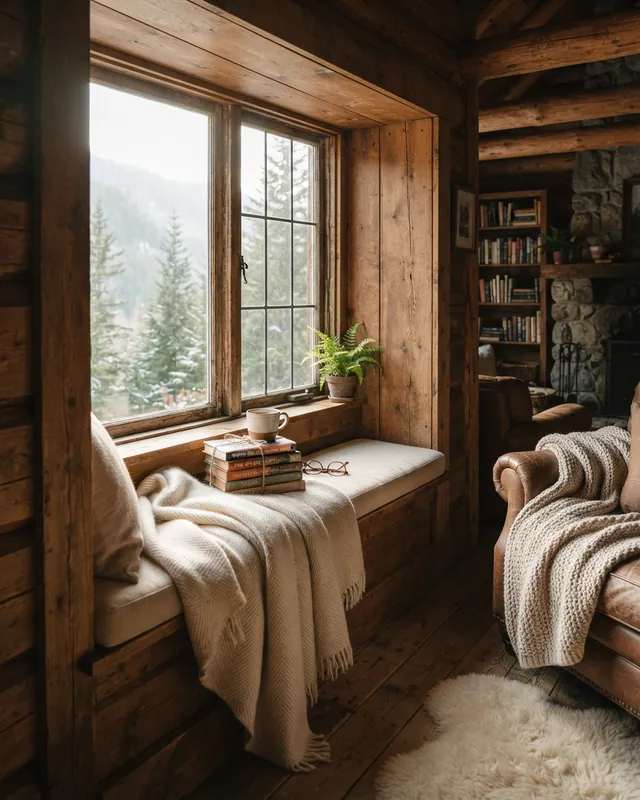
Prompt: Cozy reading nook in a timber cabin, morning light streaming through the window onto a wool throw and stacked books
Real result · Editorial · 4:5 · more about this image: Cabin reading nook
Which one to choose
Choose Raphael AI if…
- You want many models, including higher-resolution ones.
- You need reference images, an editor or an upscaler.
- Watermarked, non-commercial free images are fine for you.
- You'll make lots of images and want a credit subscription.
Choose AIPhoto-Generator if…
- You want free images without a visible watermark.
- You'd rather have one simple tool than a model picker.
- You want packs that don't expire instead of credits that last six months.
- You want the free images at the same size as paid ones.
Raphael AI is a trademark of its owner. AIPhoto-Generator isn't affiliated with it. How we compare
Questions
Is Raphael AI free?
It has a free model you can use without an account, at 0.5K in a short queue, and signing in adds free daily credits. Its pricing page says free images carry a watermark, and its terms limit them to personal, non-commercial use.
Does Raphael AI add a watermark?
On free images, according to its pricing page; its paid plans list no watermarks. AIPhoto-Generator doesn't add a visible watermark on any plan.
Which one has more models?
Raphael AI, which offers Nano Banana, GPT Image and Seedream models and routes prompts between them. AIPhoto-Generator uses a single model, listed on our About page.
Raphael's homepage says I can use images commercially. Which is right?
Its pages disagree. One answer on its homepage says images can be used commercially, but other answers on the same page, its pricing page and its Terms of Service say free users may use images only for personal, non-commercial purposes "unless Raphael expressly states otherwise", with commercial use for paid subscribers. Check with Raphael before using free images commercially.